


Logging

The Logging admin page on the ROGER365.io platform is designed to help you troubleshoot system issues effectively. It provides detailed logs to quickly identify errors and malfunctions, helping you resolve problems faster. You can also track changes made by automated processes, like User Synchronization, for a clearer understanding of the system’s behavior.
If you are unable to resolve the issue yourself, data from the Logging admin page provides crucial information for your dedicated ROGER365 partner.
The Logging admin page classifies all records into three main severities:
- Info
- Warning
- Exception
Each severity is categorized based on the affected component, such as “ContactCenter”, “CRM”, “AI Flow”, “Presence” and more.
To view the details of a specific record, the portal admin should click on it:
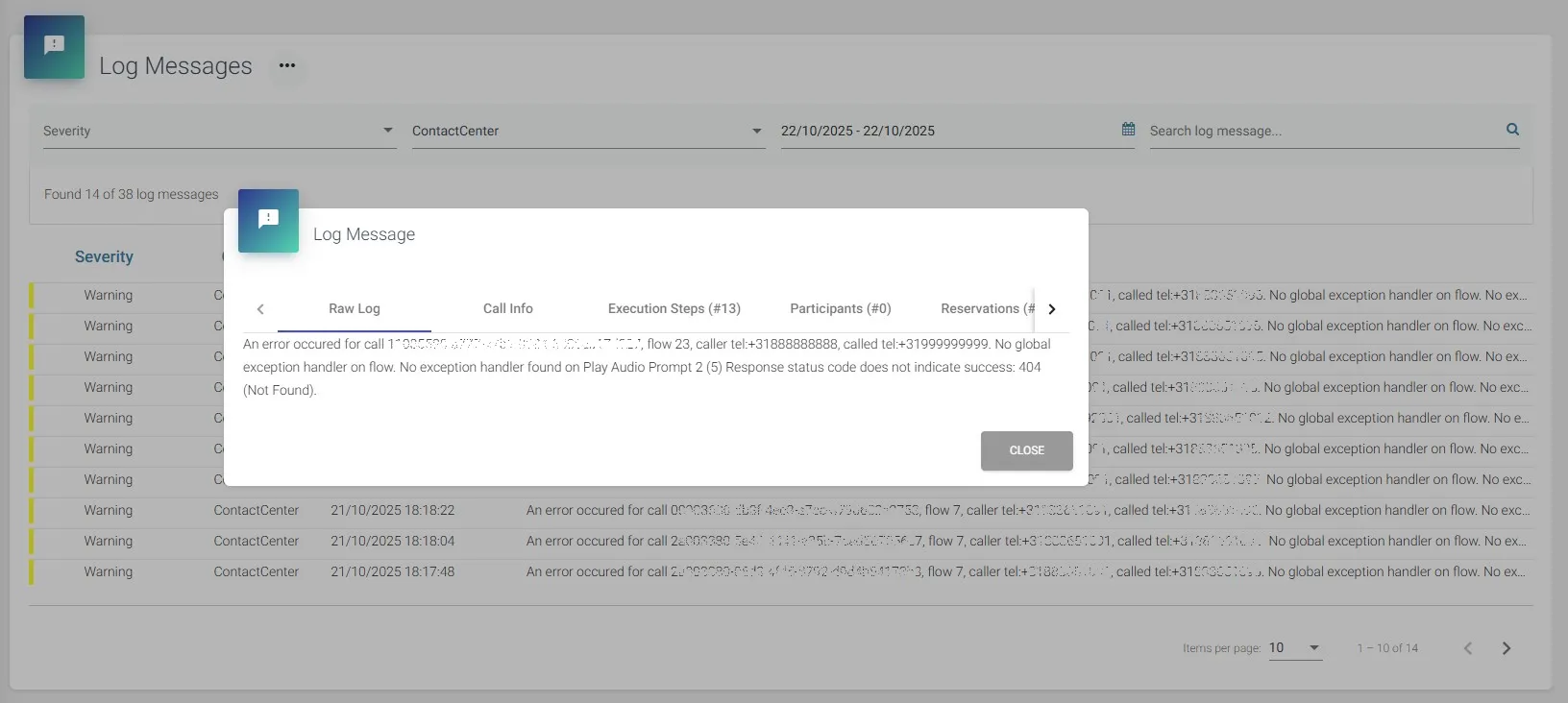
Where:
- Raw Log – This section presents an overview of the message.
- Call Info – This section presents an overview of call’s main details.
- Execution Steps – This section presents the caller’s journey through the actions in the call flow, highlighting the point of failure (marked in red).
- Participants – This section lists the call participants (if any).
- Reservations – This section displays the requests created by the Queue action.
- Stream Changes – This section shows the changes in the audio stream of the calling parties.
Note: The ROGER365.io platform only receives the metadata of a call.