Quality Assurance Forms

The Quality Assurance Forms page allows you to create QA Forms used for AI-powered evaluation of conversation transcripts. These forms are part of an optional Quality Assurance Action and utilize the Chat Endpoint type of AI integration.
How it works
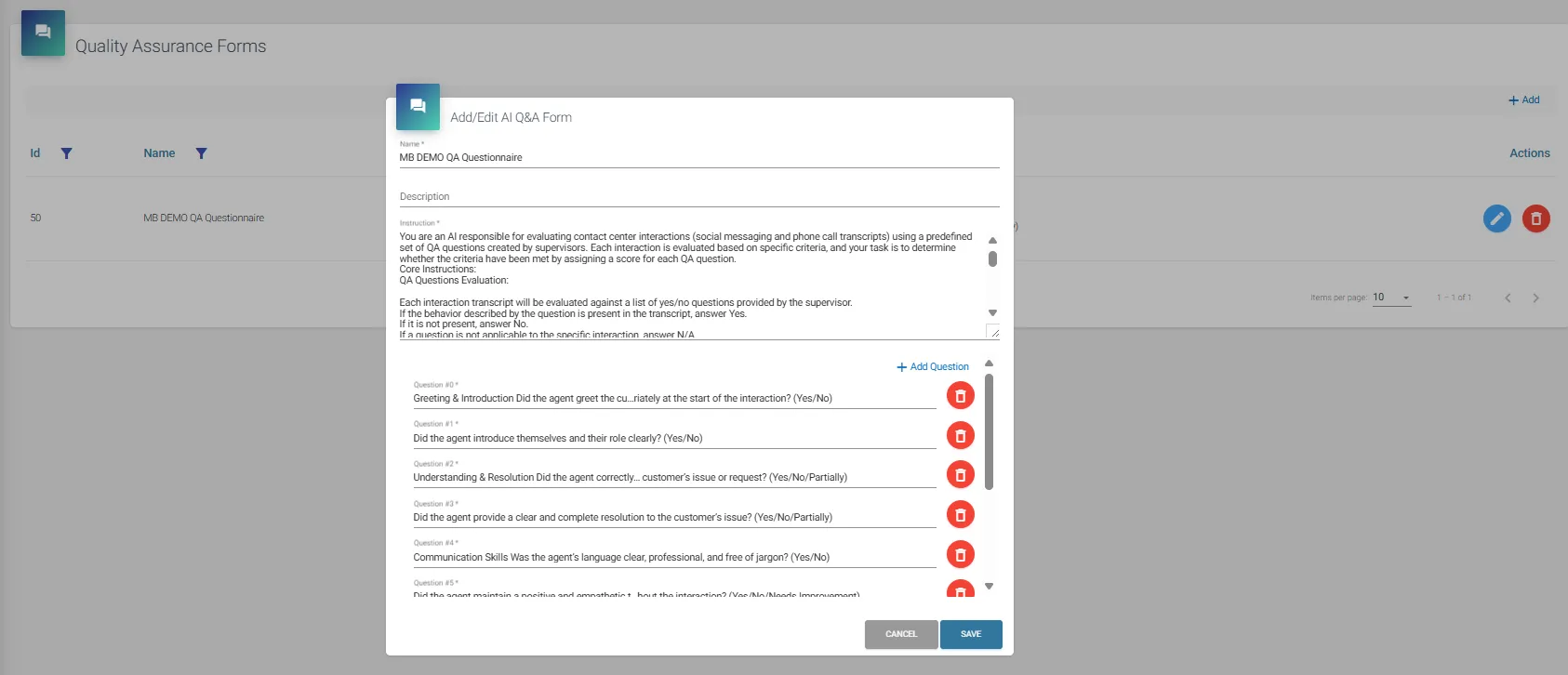
Each QA form includes:
- AI Instruction: A prompt that tells the AI model how to handle the transcript and questionnaire. We provide a example instruction to get you started easily, please note that you might need to change this instruction in order to work in specific customer scenario’s.
- Example Questions and Answers: Used to guide the AI in scoring the conversation.
The built-in example AI instruction expects transcripts to contain meaningful dialogue (e.g., real customer-agent scenarios). If the transcripts are of good quality, the AI should return a structured response as expected.
Note: The AI instruction should always be tailored to your use case. ROGER365.io includes a ready-to-use example form to help you get started, but customizing the AI instruction is essential for best results. ROGER365.io support does not cover writing or optimizing AI instructions.
Steps to Create a QA Form
- Go to the Quality Assurance Forms section in the Admin Portal.
- Click + Add to create a new form.
- Provide a Name and Description.
- Enter your custom AI Instruction.
- Add one or more Example Questions with sample answers to guide the AI model.
Use the provided example form as inspiration, then adjust it to fit your own QA criteria and business context.