


Menu
Thank you! Your submission has been received!
Oops! Something went wrong while submitting the form.
Getting Started
How to use
10
30
No items found.
40
Setup - General
No items found.
10
20
No items found.
50
No items found.
60
No items found.
80
No items found.
100
No items found.
110
No items found.
120
Setup - Contact Center
No items found.
30
No items found.
20
40
No items found.
50
No items found.
65
No items found.
70
No items found.
80
CRM
50
DTMF
70
HTTPAction
100
IF
110
Last agent
120
Merge
150
OpenAI
160
Queue
180
Reject
190
Schedule
210
Send Webhook
220
Set language
230
Set Variable
240
Subflow
270
Switch
280
Transfer
300
Wait Timer
320
WaitForEnd
330
90
No items found.
110
No items found.
120
No items found.
130
No items found.
140
No items found.
60
Setup - Social Messaging
API
Go to

Description
| Component | Description |
|---|---|
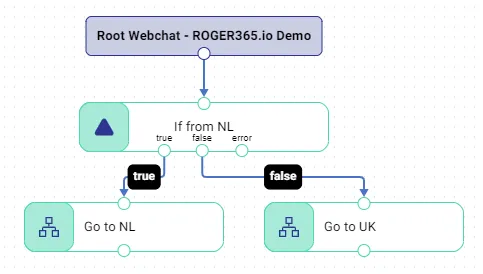
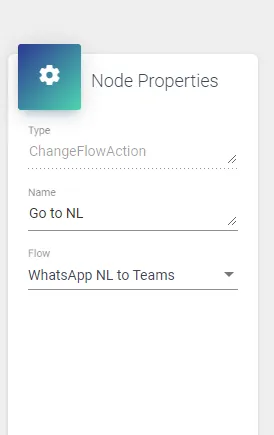
| Go to | With this component you can create a subflow to a main flow. For example if you would like to route incoming whatsapp conversations based on the country code of the whapsapp number. In this case the IF statement “System.Text.RegularExpressions.Regex.IsMatch(EndpointMessage.EndpointParticipantId, “[+]?31.*”)” checks if the number starts with +31, then it routes the conversation to a subflow named ‘WhatsApp NL to Teams) |
Node Properties
| Node Properties | Description | Input type |
|---|---|---|
| Flow | Select the subflow (Subflow must have the same Rootnode as the main flow) | Select from list |