


AI Endpoints

The AI Endpoints admin page (part of AI Flow Enterprise feature) allows to create Endpoint configurations used for AI Flow actions.
To create Endpoint configurations navigate to “AI Endpoints” admin page and press “+Add”.
There are 4 different types of the Endpoint:
- Azure AI Speech Service (Direct API v3.2 or Cognitive Services)
- These Speech to Text endpoints are used for mandatory Transcript Action.
- Azure AI Language Service (Analyze Conversations API – Cognitive Services)
- This Analyze Conversations endpoint is used for optional Summary and Sentiment actions.
- Chat Endpoint
- This Chat Endpoint is used for optional Quality Assurance Action.
- Azure Open AI Endpoint
- This Azure Open AI Endpoint is used for optional Classification Action.
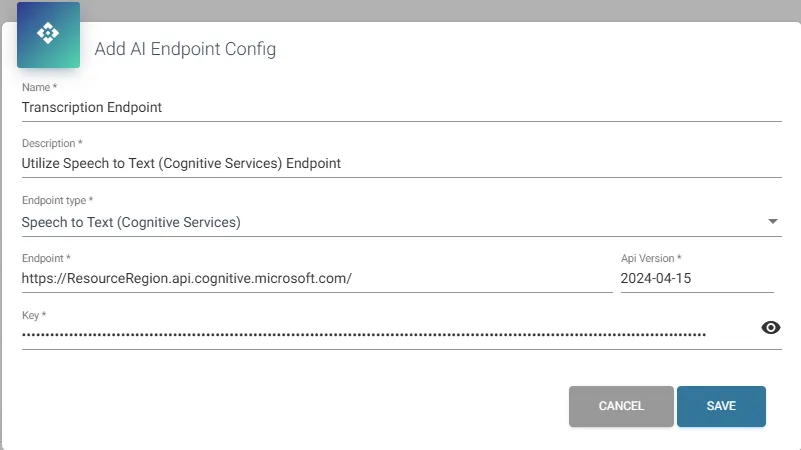
Creating Speech To Text Endpoint (Direct API or Cognitive Services)
To create Speech To Text Endpoint, you must first create Speech service resource which can be found in Azure AI Foundry service within the Azure portal.
- Name: Provide a name for Speech To Text Endpoint.
- Description: Provide the description of Speech To Text Endpoint.
- Endpoint: Depending on created Endpoint type URL will be:
- Speech to Text – Direct API (v3.2), for example: https://<ResourceRegion>.api.cognitive.microsoft.com/speechtotext/v3.2/
- Speech to Text (Cognitive Services), for example: https://<your-resource-name>.cognitiveservices.azure.com/
- For the Speech to Text (Cognitive Services), you must provide Api version.
- Key: Authentication Key for the Speech service.
For more information about this Speech Service see What is the Speech service? – Azure AI services | Microsoft Learn
The Batch Transcription method of this service is being used. A customer can calculate the costs for this service via the Azure Calculator.
For more information about the Speech Service version see Speech to text REST API – Speech service – Azure AI services | Microsoft Learn
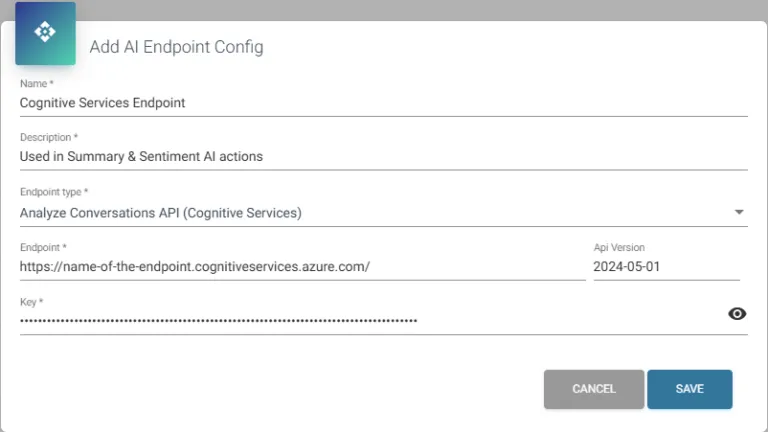
Creating AI Language Service (Analyze Conversations API – Cognitive Services)
To create this Endpoint, you must first provision a Language Service (AI Language) resource, which is available under the Azure AI Foundry service in the Azure portal. Optionally, you can use an Azure OpenAI model; however, this approach is not recommended due to potential performance and cost implications.
- Name: Provide a name for Cognitive Services Endpoint.
- Description: Provide the description of Cognitive Services Endpoint.
- Endpoint: Provide the Endpoint URL, for example: https://<<name-of-the-endpoint>>.cognitiveservices.azure.com/ or https://<name-of-OpenAI-resource>.openai.azure.com/
- Api Version: Provide the Api Version for your Cognitive Services or Azure OpenAI resource. Starting with version “2024-05-01”, the follow-up tasks summary aspect is supported.
- Key: Authentication Key for the Cognitive Services or Azure OpenAI resource.
For more information about this Language Service see What is Azure AI Language – Azure AI services | Microsoft Learn and the OpenAI What is Azure OpenAI in Azure AI Foundry Models? | Microsoft Learn
The Analyze-conversation method of this service is being used. A customer can calculate the costs for this service via the Azure Calculator.
For more information about the Language Service version see Azure AI Language REST API reference | Microsoft Learn
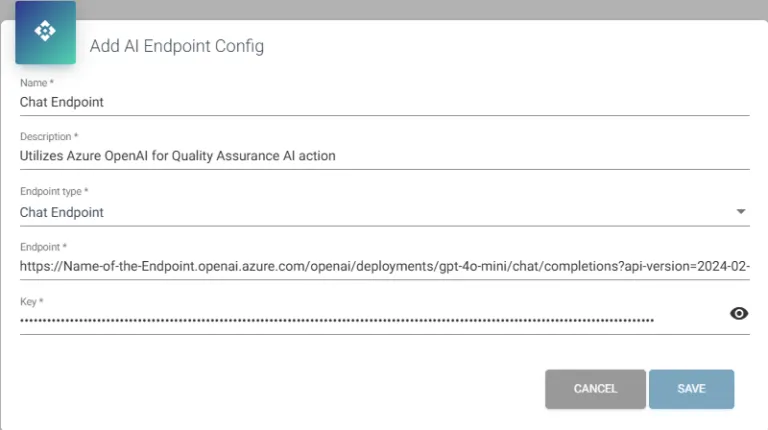
Creating Chat Endpoint
To create Chat Endpoint, you must first create (deploy) Azure OpenAI’s model in Azure AI Foundry service within the Azure portal.
- Name: Provide a name for Chat Endpoint.
- Description: Provide the description of Chat Endpoint.
- Endpoint: Provide the Endpoint URL, for example: https://<<name-of-the-endpoint>>.openai.azure.com/openai/deployments/gpt-4o-mini/chat/completions?api-version=2024-02-15-preview
- Key: Authentication Key for the Azure OpenAI model.
For more information about this OpenAI Chat service see What is Azure OpenAI in Azure AI Foundry Models? | Microsoft Learn
The chat completion method of this service is being used. A customer can calculate the costs for this service via the Azure Calculator.
For more information about the OpenAI Service version see Azure OpenAI in Azure AI Foundry Models model retirements – Azure OpenAI | Microsoft Learn
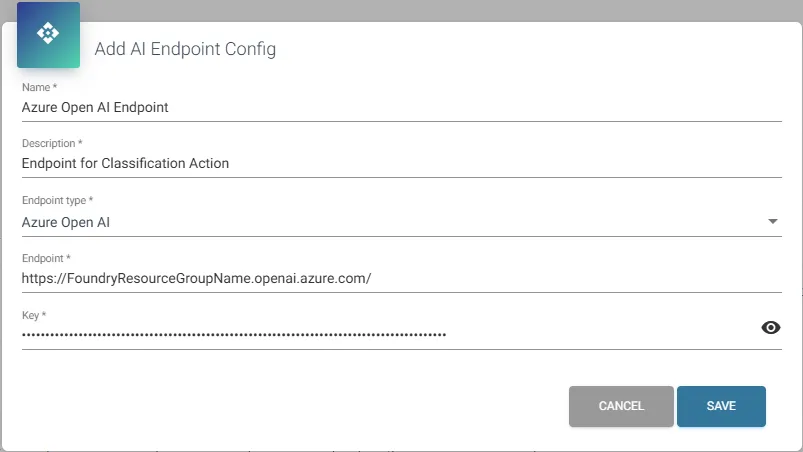
Creating Azure Open AI Endpoint
To create Azure AI Endpoint, you must first create the Foundry resource group in Microsoft Foundry portal. The Foundry resource group utilizes the Azure OpenAI interface endpoint.
- Name: Provide a name for Azure Open AI Endpoint.
- Description: Provide the description of Azure Open AI Endpoint.
- Endpoint: Provide the Endpoint URL, for example: https://<<FoundryResourceGroupName>>.openai.azure.com/
- Key: Authentication Key for the Azure OpenAI Endpoint.
Endpoint URL and Key of created Foundry resource group can be found in “Overview” page in Microsoft Foundry portal (Azure OpenAI library).
More information about how to create Foundry resource group see Quickstart: Set up your first Foundry resource.