Menu
Thank you! Your submission has been received!
Oops! Something went wrong while submitting the form.
Getting Started
How to use
10
30
No items found.
40
Setup - General
No items found.
10
20
No items found.
50
No items found.
60
No items found.
80
No items found.
100
No items found.
110
No items found.
120
Setup - Contact Center
No items found.
30
No items found.
20
40
No items found.
50
No items found.
65
No items found.
70
No items found.
80
CRM
50
DTMF
70
HTTPAction
100
IF
110
Last agent
120
Merge
150
OpenAI
160
Queue
180
Reject
190
Schedule
210
Send Webhook
220
Set language
230
Set Variable
240
Subflow
270
Switch
280
Transfer
300
Wait Timer
320
WaitForEnd
330
90
No items found.
110
No items found.
120
No items found.
130
No items found.
140
No items found.
60
Setup - Social Messaging
API
SendMessageTo

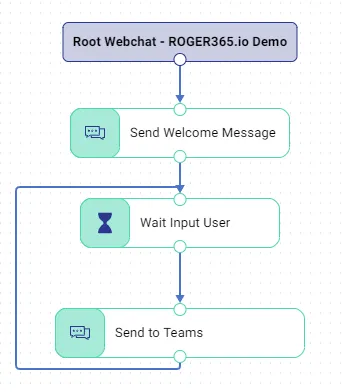
Description
| Component | Description |
|---|---|
| SendMessageTo | Send a message to a TouchPoint |
Node Properties
| Node Properties | Description | Input type |
|---|---|---|
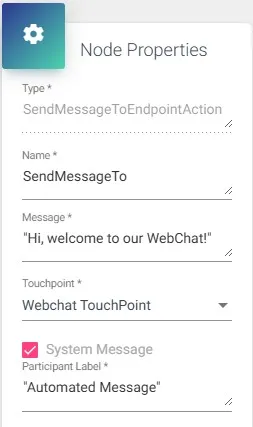
| Message | Here you can enter a message, select a variable or a PredefinedMessage which will be send to the user | “text” / variable (string) / PredefinedMessage[“<namepredefinedmessage>”] |
| TouchPoint | TouchPoint where the message must be sent to | Select from list |
| System Message | If selected, the message send trough this action is not counted in the reporting page | Checkbox |
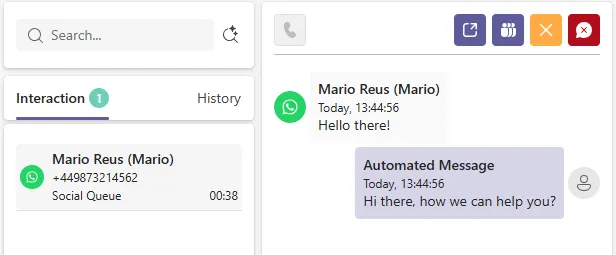
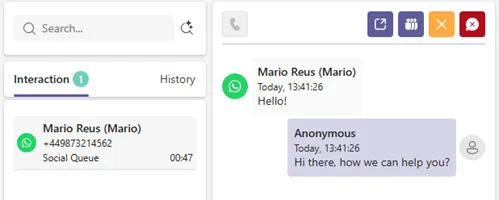
| Participant Label | If System Message enabled, allows to set Participant Label for automated messages visible to the agent at Social Queue | String |
Link Properties
| Link Properties | Description | Input type |
|---|---|---|
| Any | The default link to go the next step | Label can be used to add a description to this link |
| Error | The link to follow when an error occurs |
Participant Label example
Before:
After: