


Menu
Thank you! Your submission has been received!
Oops! Something went wrong while submitting the form.
Getting Started
How to use
10
30
No items found.
40
Setup - General
No items found.
10
20
No items found.
50
No items found.
60
No items found.
80
No items found.
100
No items found.
110
No items found.
120
Setup - Contact Center
No items found.
30
No items found.
20
40
No items found.
50
No items found.
65
No items found.
70
No items found.
80
CRM
50
DTMF
70
HTTPAction
100
IF
110
Last agent
120
Merge
150
OpenAI
160
Queue
180
Reject
190
Schedule
210
Send Webhook
220
Set language
230
Set Variable
240
Subflow
270
Switch
280
Transfer
300
Wait Timer
320
WaitForEnd
330
90
No items found.
110
No items found.
120
No items found.
130
No items found.
140
No items found.
60
Setup - Social Messaging
API
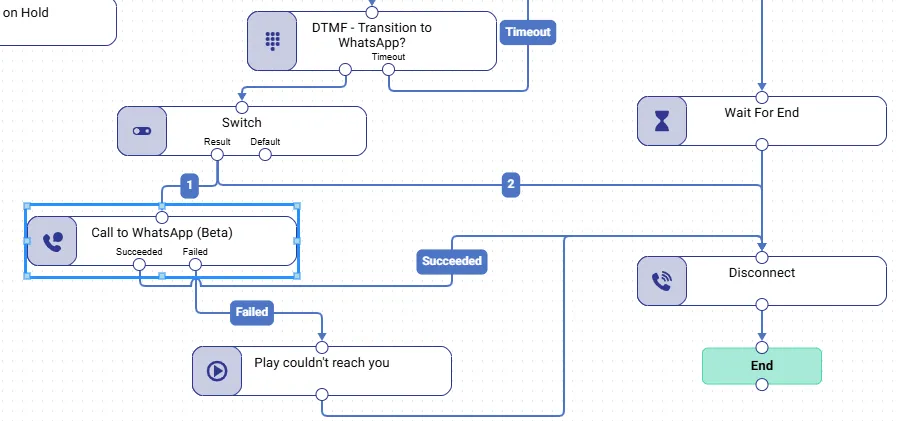
Call to WhatsApp (Beta)

This feature is only available in the Business and Enterprise subscriptions.
Disclaimer: Make sure to have at least one WhatsApp template configured at any of existing WhatsApp TouchPoints before proceeding!
Description
| Component | Description |
|---|---|
| Call to WhatsApp (Beta) | Action to send WhatsApp template to caller’s phone number to continue conversation via messages. Receiver shall respond on delivered template to start Social conversation. |
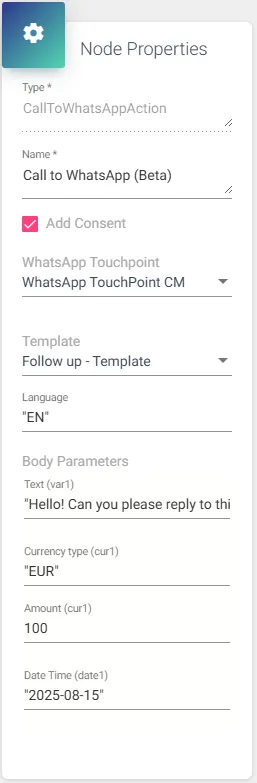
Node Properties
| Node Properties | Description | Input type |
|---|---|---|
| Add Consent | Provide target phone number as a string or variable for creating callback record. | Checkbox |
| WhatsApp TouchPoint | Select configured earlier WhatsApp TouchPoint which does have template. | Select from List |
| Template | Select configured earlier WhatsApp template. | Select from List |
| Language | Select WhatsApp template’s language. | Select from List |
| Body Parameters | Body parameters shall be configured according to your WhatsApp template specifications. |