


Callback request

The Callback Request feature is designed to streamline communication with customers by sending a request for a callback. This feature allows businesses to easily initiate follow-up actions and enhance customer engagement, regardless of whether the initial interaction was via a call or other communication methods.
There are three types of callback request options available:
- Email: Send an email to the selected contact with a request for a callback. By default, sender’s email address is “no_reply@roger365.io”, to send Email callback requests using own email address (for instance of Shared Mailbox), make sure that one of the Email configurations is set as “Default”.
- Webhook: Trigger a webhook to automatically send callback data to a specified URL (mostly Logic Apps). This option is perfect for integrating callback requests into automated workflows or systems that handle customer service or follow-up processes.
- Mailto Link: Create a Mailto link that opens the agent’s email client with a pre-configured message requesting a callback. This allows the agent’s email address to be used as the sender, including any configured email signature. It’s a simple and efficient way to request a follow-up action via email.
To configure Callback request navigate to General admin page, and press “Configure Callback Requests”.
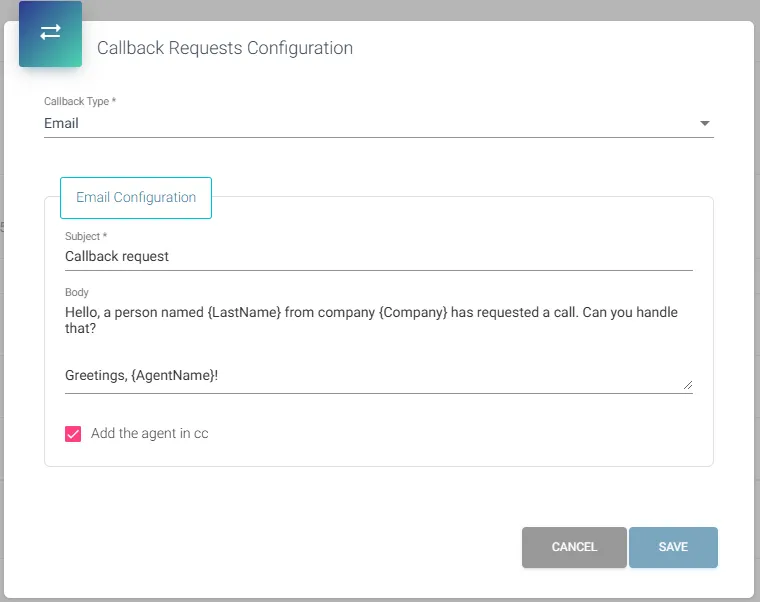
The body of the Callback request supports the use of variables, such as {DisplayName}. You can use any variable from your CRM Replicator, CRM available variables are listed in documentation page about Custom CRM Replicator – section POST JSON (remember about curly brackets). Additionally you can make usage of {AgentName} and {PhoneNumber} variables.