


Flows

The Flows page lets you create AI Flow configurations that are used in agent calls. From here, you can also rerun failed AI Flow instances. Each AI Flow has a rerun button showing the number of Failed instances, alongside counters for how many records are currently Queued, In Progress, or Abandoned. After three unsuccessful rerun attempts, the record is marked as Abandoned and won’t be rerun again.
After configuring mandatory Audio Provider & Transcript actions (or including optional actions), navigate to “Flows” page at ROGER365.io admin portal:
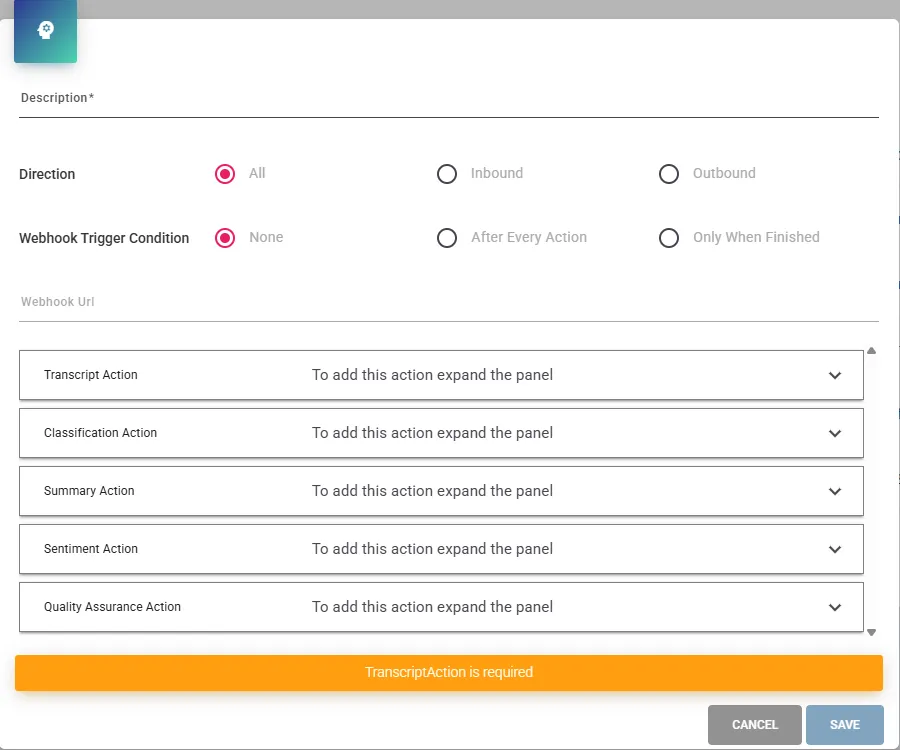
- Description – name of your AI Flow configuration
- Direction – for which call direction the AI Flow will be initiated
- Webhook Trigger Condition & Webhook URL – defines when the webhook is triggered during the call, and the endpoint (URL) to which the webhook request is sent
After this step, the Audio Provider and Transcript configurations must be assigned in the Transcript Action panel. If configured, assign optional configurations to the corresponding panels.
Transcript, Summary, and Sentiment actions have optional settings available. More information can be found in the Microsoft documentation.
- Transcript Action – Microsoft reference
- Summary Action – Microsoft reference
- Sentiment Action – Microsoft reference
Beside of that, it is possible to decide whether results of each actions supposed to be saved (in order to retrieve them later via APIs).
Each AI Action does have certain functionality:
- Transcript Action – responsible for transcribing the recorded call based on the recording delivered by the selected Audio Provider configuration.
- Notes: The Tollring Audio Provider can provide its own Transcription service. Before enabling it, make sure your Tollring license includes this feature and the “Provides Transcript” option is enabled in the Tollring Audio Provider configuration. The Tollring Audio Provider can be used with the transcription service provided by the Microsoft.
- Classification Action – is responsible for automatic Classification of the call based on defined instructions in created earlier Classification Action Configurations.
- Summary Action – is responsible for summarizing entire call.
- Sentiment Action – is responsible for assesing sentiment score based on tone of the conversation.
- Quality Assurance Action – is responsible for evaluating call interactions with customers based on various criteria defined in created earlier Quality Assurance Form.
Created AI Flow must be assigned. This can be done in two ways:
- Assign AI Flow to created earlier Agent Profile. This will enable an AI Flow for every agent assigned to Agent Profile.
- Assign AI Flow to specific agent via Agents admin page.
Portal admin does have option offering an agent a button in Agent Assist tab to opt-out AI Flow for the current call, this option may be useful when certain conversation should not be processed by various AI actions. More information on Agent Assist documetation page.