
Search
Webhook
Setup - Contact Center
Graphical Designer
Webhook
Text Link
Voice bot
Setup - Contact Center
Graphical Designer
Voice bot
Text Link
Transfer
Setup - Contact Center
Graphical Designer
Transfer
Text Link
Text to speech
Setup - Contact Center
Graphical Designer
Text to speech
Text Link
Start
Setup - Contact Center
Graphical Designer
Start
Text Link
Split
Setup - Contact Center
Graphical Designer
Split
Text Link
Set variable
Setup - Contact Center
Graphical Designer
Set variable
Text Link
Set language
Setup - Contact Center
Graphical Designer
Set language
Text Link
Schedule
Setup - Contact Center
Graphical Designer
Schedule
Text Link
Queue
Setup - Contact Center
Graphical Designer
Queue
Text Link
Play prompt
Setup - Contact Center
Graphical Designer
Play prompt
Text Link
Participant left
Setup - Contact Center
Graphical Designer
Participant left
Text Link
Merge
Setup - Contact Center
Graphical Designer
Merge
Text Link
If
Setup - Contact Center
Graphical Designer
If
Text Link
Hang up
Setup - Contact Center
Graphical Designer
Hang up
Text Link
Get queue info
Setup - Contact Center
Graphical Designer
Get queue info
Text Link
CRM lookup
Setup - Contact Center
Graphical Designer
CRM lookup
Text Link
Answer
Setup - Contact Center
Graphical Designer
Answer
Text Link
Personal Agent API (Outbound Call)
API
Contact Center
Personal Agent API (Outbound Call)
Text Link
Personal Agent API (Outbound Queues)
API
Contact Center
Personal Agent API (Outbound Queues)
Text Link
Personal Agent API (Verify Key Owner)
API
Contact Center
Personal Agent API (Verify Key Owner)
Text Link
Shift Synchronization
Setup - Social Messaging
Queues
Shift Synchronization
Text Link
Example PowerShell script
Setup - General
CRM
Example PowerShell script
Text Link
Agent
How to use
Contact Center
Agent
Text Link
SocialConversationParticipant Export
API
Social Messaging
SocialConversationParticipant Export
Text Link
SocialConversationInfo Export
API
Social Messaging
SocialConversationInfo Export
Text Link
SocialQueue Export
API
Social Messaging
SocialQueue Export
Text Link
Virtual Call Info
API
Contact Center
Virtual Call Info
Text Link
Quality Assurance
API
AI Flow
Quality Assurance
Text Link
Sentiment
API
AI Flow
Sentiment
Text Link
Summary
API
AI Flow
Summary
Text Link
Transcript
API
AI Flow
Transcript
Text Link
MCP Server Setup
API
General
MCP Server Setup
Text Link
Customer data
API
General
Customer data
Text Link
General
How to use
Contact Center
General
Text Link
Create App Registration for Email TouchPoint
Setup - Social Messaging
Email Touchpoint
Create App Registration for Email TouchPoint
Text Link
Module settings
Setup - General
Insights & Analytics
Module settings
Text Link
Examples
Setup - General
Permissions
Examples
Text Link
Setup Access
Setup - General
Permissions
Setup Access
Text Link
Configure Teams client to enable Toastar
Setup - General
CRM Calling Integration (Toastar)
Configure Teams client to enable Toastar
Text Link
Enable users
Setup - General
CRM Calling Integration (Toastar)
Enable users
Text Link
Webhook & Postback URL
Setup - General
CRM Calling Integration (Toastar)
Webhook & Postback URL
Text Link
Add TOASTAR App to Teams
Setup - General
CRM Calling Integration (Toastar)
Add TOASTAR App to Teams
Text Link
Create Teams Virtual User
Setup - General
CRM Calling Integration (Toastar)
Create Teams Virtual User
Text Link
Register Azure BOT Channel
Setup - General
CRM Calling Integration (Toastar)
Register Azure BOT Channel
Text Link
Example PowerShell script
Setup - General
Custom CRM Connector
Example PowerShell script
Text Link
Phonebook
Setup - General
CRM Replicator
Phonebook
Text Link
Webchat to Teams
Setup - Social Messaging
Examples
Webchat to Teams
Text Link
WhatsApp to Teams
Setup - Social Messaging
Examples
WhatsApp to Teams
Text Link
Recognize customer by email
Setup - Social Messaging
Examples
Recognize customer by email
Text Link
Use webchat form to recognize customer
Setup - Social Messaging
Examples
Use webchat form to recognize customer
Text Link
Start voice call (Beta)
Setup - Social Messaging
Graphical Designer
Start voice call (Beta)
Text Link
CRM
Setup - Social Messaging
Graphical Designer
CRM
Text Link
AddTranscript
Setup - Social Messaging
Graphical Designer
AddTranscript
Text Link
Translate
Setup - Social Messaging
Graphical Designer
Translate
Text Link
OpenAI
Setup - Social Messaging
Graphical Designer
OpenAI
Text Link
GetFormInput
Setup - Social Messaging
Graphical Designer
GetFormInput
Text Link
HttpAction
Setup - Social Messaging
Graphical Designer
HttpAction
Text Link
Go to
Setup - Social Messaging
Graphical Designer
Go to
Text Link
Convert Image
Setup - Social Messaging
Graphical Designer
Convert Image
Text Link
SetAction
Setup - Social Messaging
Graphical Designer
SetAction
Text Link
GetPageVisits
Setup - Social Messaging
Graphical Designer
GetPageVisits
Text Link
Sentiment
Setup - Social Messaging
Graphical Designer
Sentiment
Text Link
Powerhook
Setup - Social Messaging
Graphical Designer
Powerhook
Text Link
SendEmailAction
Setup - Social Messaging
Graphical Designer
SendEmailAction
Text Link
Chatbot
Setup - Social Messaging
Graphical Designer
Chatbot
Text Link
Get Transcript
Setup - Social Messaging
Graphical Designer
Get Transcript
Text Link
Set Participant
Setup - Social Messaging
Graphical Designer
Set Participant
Text Link
Schedule
Setup - Social Messaging
Graphical Designer
Schedule
Text Link
Merge
Setup - Social Messaging
Graphical Designer
Merge
Text Link
Choice
Setup - Social Messaging
Graphical Designer
Choice
Text Link
IF
Setup - Social Messaging
Graphical Designer
IF
Text Link
WaitInput
Setup - Social Messaging
Graphical Designer
WaitInput
Text Link
SendMessageTo
Setup - Social Messaging
Graphical Designer
SendMessageTo
Text Link
The basics
Setup - Social Messaging
Graphical Designer
The basics
Text Link
Webhooks for SMS Provider
Setup - Social Messaging
SMS TouchPoint
Webhooks for SMS Provider
Text Link
Sandbox cm.com
Setup - Social Messaging
WhatsApp for Business TouchPoint
Sandbox cm.com
Text Link
WhatsApp OUT
Setup - Social Messaging
WhatsApp for Business TouchPoint
WhatsApp OUT
Text Link
Adding templates
Setup - Social Messaging
WhatsApp for Business TouchPoint
Adding templates
Text Link
Webhooks for WhatsApp Providers
Setup - Social Messaging
WhatsApp for Business TouchPoint
Webhooks for WhatsApp Providers
Text Link
Customize Layout
Setup - Social Messaging
Webchat TouchPoint
Customize Layout
Text Link
Add status message
Setup - Social Messaging
Webchat TouchPoint
Add status message
Text Link
Webchat Parameters
Setup - Social Messaging
Webchat TouchPoint
Webchat Parameters
Text Link
Create adaptive card
Setup - Social Messaging
Microsoft Teams
Create adaptive card
Text Link
Connect Teams Channel
Setup - Social Messaging
Microsoft Teams
Connect Teams Channel
Text Link
Add ROGER365 app to Teams
Setup - Social Messaging
Microsoft Teams
Add ROGER365 app to Teams
Text Link
AI Endpoints
Setup - Contact Center
AI Flow (Beta)
AI Endpoints
Text Link
Classification Action Configurations
Setup - Contact Center
AI Flow (Beta)
Classification Action Configurations
Text Link
Quality Assurance Forms
Setup - Contact Center
AI Flow (Beta)
Quality Assurance Forms
Text Link
Audio Providers
Setup - Contact Center
AI Flow (Beta)
Audio Providers
Text Link
Flows
Setup - Contact Center
AI Flow (Beta)
Flows
Text Link
Last Conversation Data
Setup - Contact Center
Graphical Designer
Last Conversation Data
Text Link
Call to SMS (Beta)
Setup - Contact Center
Graphical Designer
Call to SMS (Beta)
Text Link
Store feedback
Setup - Contact Center
Graphical Designer
Store feedback
Text Link
Call to WhatsApp (Beta)
Setup - Contact Center
Graphical Designer
Call to WhatsApp (Beta)
Text Link
Cancel Virtual Call
Setup - Contact Center
Graphical Designer
Cancel Virtual Call
Text Link
Get Virtual Call Info
Setup - Contact Center
Graphical Designer
Get Virtual Call Info
Text Link
Make Call Virtual
Setup - Contact Center
Graphical Designer
Make Call Virtual
Text Link
OpenAI
Setup - Contact Center
Graphical Designer
OpenAI
Text Link
Last agent
Setup - Contact Center
Graphical Designer
Last agent
Text Link
Graphical Designer
Graphical Designer
Text Link
Callback request
Setup - Contact Center
Callback request
Text Link
Custom hold prompt
Setup - Contact Center
Custom hold prompt
Text Link
Agent Profiles
Setup - Contact Center
Agent Profiles
Text Link
Classification
Setup - General
Classification
Text Link
Access Control
Setup - General
Access Control
Text Link
Call Park
Setup - Contact Center
Call Park
Text Link
Api Keys
Setup - General
Api Keys
Text Link
Email
Setup - General
Email
Text Link
Contact Center
How to use
Contact Center
Text Link
Setup Access & Security
Setup - General
Setup Access & Security
Text Link
Schedules
Setup - Contact Center
Schedules
Text Link
Resource Accounts
Setup - Contact Center
Resource Accounts
Text Link
Queues
Setup - Contact Center
Queues
Text Link
Callflows
Setup - Contact Center
Callflows
Text Link
Audio Files
Setup - Contact Center
Audio Files
Text Link
Agents
Setup - Contact Center
Agents
Text Link
Logging
How to use
Logging
Text Link
Audit
Setup - General
Audit
Text Link
CRM
Setup - General
CRM
Text Link
Languages
Setup - General
Languages
Text Link
Create Tenant App
Setup - General
Create Tenant App
Text Link
Getting started
Getting started
Getting started
Text Link
Subscriptions
How to use
Subscriptions
Text Link
Call Flows
Setup - Contact Center
Call Flows
Text Link
AI Flow
API
AI Flow
Text Link
Copilot Touchpoint
Setup - Social Messaging
Copilot Touchpoint
Text Link
Insights & Analytics
Setup - General
Insights & Analytics
Text Link
Wallboard
Setup - General
Wallboard
Text Link
Permissions
Setup - General
Permissions
Text Link
Logging
Setup - General
Logging
Text Link
CRM Calling Integration (Toastar)
Setup - General
CRM Calling Integration (Toastar)
Text Link
Custom CRM Connector
Setup - General
Custom CRM Connector
Text Link
Default CRM Connectors
Setup - General
Default CRM Connectors
Text Link
CRM Replicator
Setup - General
CRM Replicator
Text Link
Email Configuration
Setup - General
Email Configuration
Text Link
Schedules
Setup - General
Schedules
Text Link
Agent Assist
Setup - General
Agent Assist
Text Link
Setup Access & Security
Setup - General
Setup Access & Security
Text Link
Malicious File Blocking
Setup - Social Messaging
Malicious File Blocking
Text Link
Wallboard
Setup - Social Messaging
Wallboard
Text Link
Reporting
Setup - Social Messaging
Reporting
Text Link
Messages
Setup - Social Messaging
Messages
Text Link
Examples
Setup - Social Messaging
Examples
Text Link
Graphical Designer
Setup - Social Messaging
Graphical Designer
Text Link
Using the library
Setup - Social Messaging
Using the library
Text Link
Email Touchpoint
Setup - Social Messaging
Email Touchpoint
Text Link
API TouchPoint
Setup - Social Messaging
API TouchPoint
Text Link
Facebook TouchPoint
Setup - Social Messaging
Facebook TouchPoint
Text Link
SMS TouchPoint
Setup - Social Messaging
SMS TouchPoint
Text Link
WhatsApp for Business TouchPoint
Setup - Social Messaging
WhatsApp for Business TouchPoint
Text Link
Webchat TouchPoint
Setup - Social Messaging
Webchat TouchPoint
Text Link
Microsoft Teams
Setup - Social Messaging
Microsoft Teams
Text Link
Queues
Setup - Social Messaging
Queues
Text Link
AI Flow (Beta)
Setup - Contact Center
AI Flow (Beta)
Text Link
Classification
Setup - Contact Center
Classification
Text Link
Skill Based Routing
Setup - Contact Center
Skill Based Routing
Text Link
Reason Codes
Setup - Contact Center
Reason Codes
Text Link
Audio Prompts
Setup - Contact Center
Audio Prompts
Text Link
Agent Profiles
Setup - Contact Center
Agent Profiles
Text Link
Agents
Setup - Contact Center
Agents
Text Link
Call Park
Setup - General
Call Park
Text Link
Resource Accounts
Setup - Contact Center
Resource Accounts
Text Link
Graphical Designer
Setup - Contact Center
Graphical Designer
Text Link
Form Based callflow
Setup - Contact Center
Form Based callflow
Text Link
Using the library
Setup - Contact Center
Using the library
Text Link
Queues
Setup - Contact Center
Queues
Text Link
General
Setup - Contact Center
General
Text Link
Agent page functionalities
How to use
Agent page functionalities
Text Link
Social Messaging
How to use
Social Messaging
Text Link
Contact Center
How to use
Contact Center
Text Link
Support & Assistance
Getting Started
Support & Assistance
Text Link
Compliance by design
Getting Started
Compliance by design
Text Link
Social Messaging
API
Social Messaging
Text Link
Contact Center
API
Contact Center
Text Link
Getting Started
Getting Started
Getting Started
Text Link
General
API
General
Text Link
No results
Try a different search query
Menu
Thank you! Your submission has been received!
Oops! Something went wrong while submitting the form.
How to use
Setup - General
Getting started
Setup - Contact Center

Graphical Designer

Not available in the UnifAI Attendant license.

‍

The Callflow Designer lets you design a calling scenario graphically: you add actions to a canvas and link them to build advanced routing flows, without writing code.

Designer

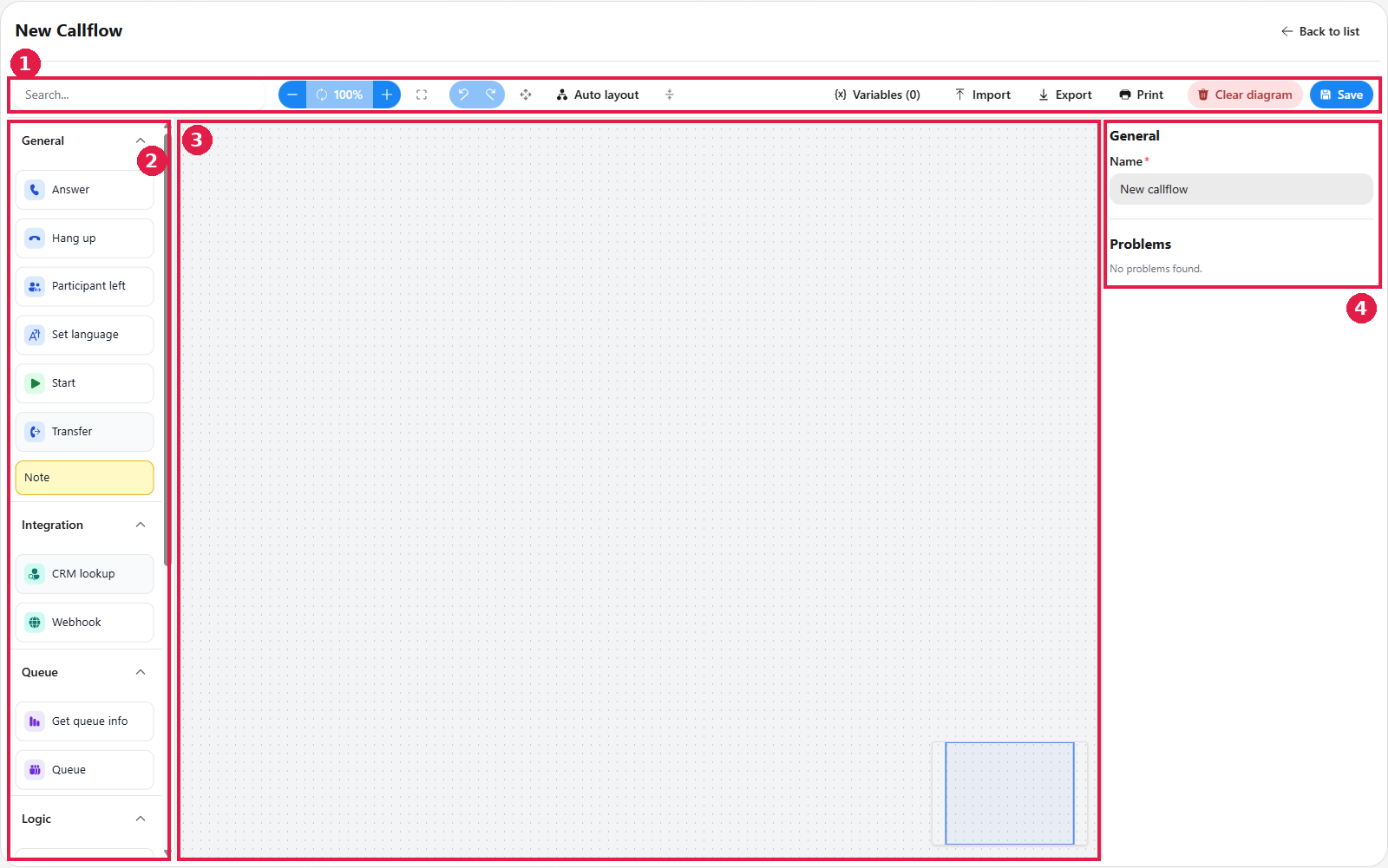
The designer is split into four areas:

  • Toolbar (top): general actions such as Search, Zoom, Undo/Redo, Auto layout, Variables, Import, Export, Print, Clear diagram and Save.
  • Actions panel (left): the available actions, grouped by category (General, Integration, Queue, Logic).
  • Flow area (middle): the canvas where you build the flow. A minimap in the bottom-right corner shows your position in larger flows.
  • Properties panel (right): the settings of the selected action. With nothing selected it shows the callflow's name and a Problems list that reports issues found in the flow.

To build a flow, drag actions from the left panel onto the flow area and link them together. Each action has its own properties, which you configure in the panel on the right.
Each callflow action is described on its own page.

The Basics

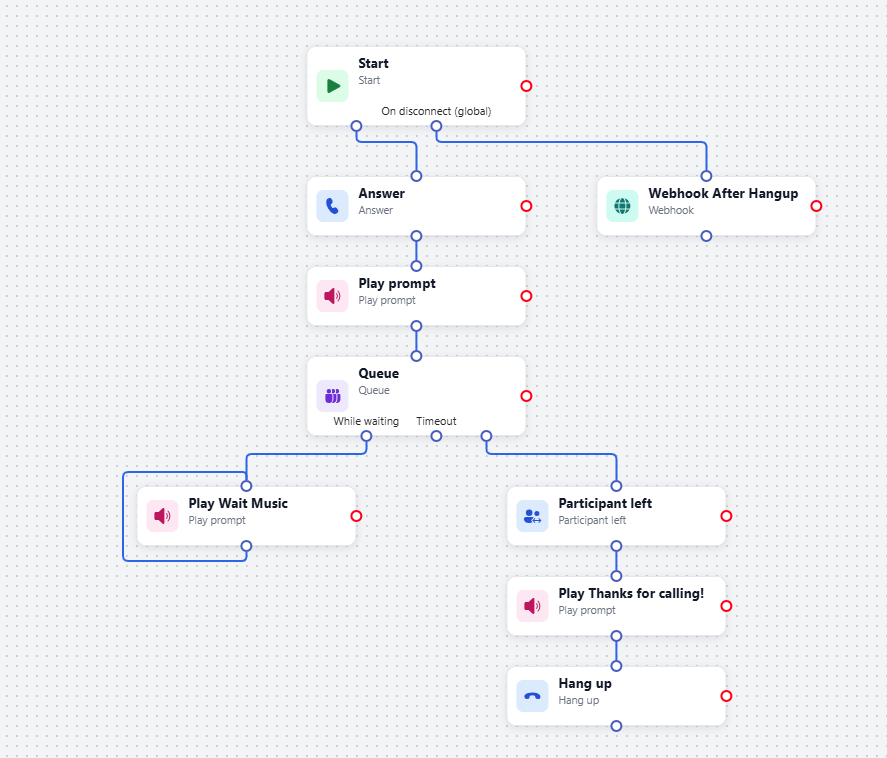
A callflow contains many types of actions, plus a few basic elements that every flow needs or can use. They are described below using an example.
Start

Every callflow begins with the Start action, which marks where the flow begins. This action is mandatory. Its On disconnect (global) output runs when the call ends, wherever the caller is in the flow.

Ending the call

A call is completed when the caller disconnects, and that is also when the Hang up action is triggered. To continue the flow once the caller has left, use Participant left.

Answer

Answer makes the platform pick up the call. The flow needs it before it can do anything with the call, such as playing an audio prompt. It is a separate action so you can place other steps, such as a webhook, before the call is answered.

Connections

To see what a connection does, click it. The properties panel then shows a Transition view with the action the connection starts from, its label and the action it leads to. In the example above, selecting the connection between Queue and Play Wait Music shows that it is labelled Loop.

Toolbar and editing tools

  • Search: finds actions in the flow from the search box on the left of the toolbar.
  • Zoom and fit: zoom the canvas in or out, or fit the whole flow on screen.
  • Undo & Redo: step backwards or forwards through your changes. Editing the flow after undoing removes the ability to redo.
  • Copy & Paste: copy highlighted actions and paste them within the same flow. Rename copied actions, since their details are duplicated.
  • Auto layout: arranges the actions on the canvas automatically.
  • Variables: define the variables used in the flow. The toolbar button shows how many are defined, for example Variables (0).
  • Import / Export: export a flow's configuration to a file, or import one. Useful for templates and for sharing a flow with customers or other engineers.
  • Print: opens a print view of the flow's configuration, which you can print or save as a PDF.
  • Clear diagram: removes every action from the canvas.
  • Save: saves the callflow. Check the Problems list in the properties panel before saving.

Related pages

  • ‍Callflows – how to create, open, clone and delete callflows from the callflow list.
On this page