


Custom CRM Connector

To enable a custom CRM connector, you have to develop your own software. We have an API available to which you can send the data. If you don’t have the expertise, we can get you in contact with one of our partner to help you.
Add Custom CRM Replicator
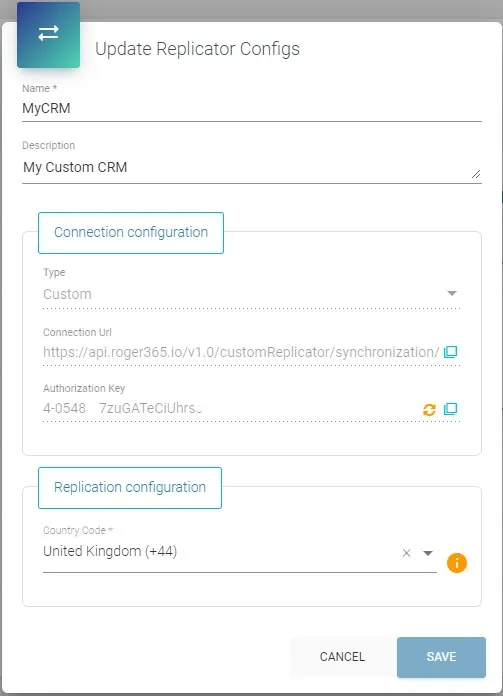
To create a replicator to which you can send your data, follow these steps:
- Go to the ROGER365 portal
- Select [CRM Replicator] in the left navigation bar
- Click [+ Add Replicator]
- Enter a [Name] and [ Description]
- Select [Custom CRM] as Type
- Choose your Country Code.
- Click [Save]
After saving, the Connection URL and Authorization key are available to you.
POST JSON
Here’s the definition in which format you can send the data.
The parameter “isPartialUpdate” and “batchIndex” are used to page the import. Start the first POST with “batchIndex=1” and “isPartialUpdate=true”. For each subsequent update, increase the batchindex by 1 and keep “isPartialUpdate=true”, then for the last update set “isPartialUpdate=false”.
The “SourceId” is required and must be unique and stay the same for a contact.
POST /v1.0/customReplicator/synchronization/{id}?isPartialUpdate=true&batchIndex=1 HTTP/1.1
Host: api.roger365.io
Authorization: {authkey}
Content-Type: application/json
HTTP body
[
  {
    "SourceId": " ",
    "FirstName": " ",
    "LastName": " ",
    "DisplayName": " ",
    "Email": " ",
    "SipAddress": " ",
    "Street": " ",
    "Zip": " ",
    "City": " ",
    "Country": " ",
    "Company": " ",
    "PhoneNumber0": " ",
    "PhoneNumber1": " ",
    "PhoneNumber2": " ",
    "PhoneNumber3": " ",
    "PhoneNumber4": " ",
    "PhoneNumber5": " ",
    "Custom0": " ",
    "Custom1": " ",
    "Custom2": " ",
    "MobileData0": " ",
    "MobileData1": " ",
    "MobileData2": " ",
    "Type": " ",
    "ContactUrl": " ",
    "ContactId": " ",
    "CompanyId": " ",
    "ActionLink0": " ",
    "ActionLink1": " ",
    "ActionLink2": " ",
    "ActionLink3": " "
  }
]
E.164 Number formatting
It might be clever to format numbers using the E.164 recommendation. An international E.164 number is designed to include all of the necessary information to successfully route a call or SMS message to an individual subscriber on a nation’s public telephone network.
Here’s how the E.164 numbering plan works:
• A telephone number can have a maximum of 15 digits
• The first part of the telephone number is the country code (one to three digits)
• The second part is the national destination code (NDC)
• The last part is the subscriber number (SN)
• The NDC and SN together are collectively called the national (significant) number
To use the previous example:
Country code: +44
National destination code: 7911
Subscriber number: 123456
In total: +447911123456
Two important things to note: First of all, in the international E.164 notation a leading ‘0’ is removed. The UK mobile phone number ‘07911 123456’ in international format is ‘+44 7911 123456’, so without the first zero. Secondly in the E.164 notation all spaces, dashes [‘-‘] and parentheses [ ‘(‘ and ‘)’] are removed, besides the leading ‘+’ all characters should be numeric.