


CRM Replicator

With the CRM Replicator contact data can be lookup in your CRM system and shown when a new phonecall arrives (CRM Calling Integration), or can be shown with incoming Social conversations. The CRM Replicator connects to your CRM system and replicates on a specific time interval to retrieve the latest data. This replicator only retrieves basic contactdata, like address, email etc.
Data will be stored encrypted in your own ROGER365 database which is not shared with other ROGER365 tenants. The advantage of this is that data can be retrieved very quickly, instead of retrieving in from your CRM system.
In our library we have some default CRM Connectors available, which you can use right out of the box. But if your CRM isn’t available yet, you can create your own Custom CRM Connector.
Each CRM replicator can include up to 4 customizable action buttons. These buttons open external CRM/ERP webpages in new tabs, prefilled with customer-specific data like email, company, or first name. The buttons are shown in the Agent Assist which can be enabled per agent. The action buttons supports usage of default CRM and Contact Center variables.
It is possible to include CRM variables such as “{Email}” or “{PhoneNumber0}” (without quotes) to make your action button using protocol handler dynamic. Additionally, you can use default Contact Center variables.
The CRM’s Action Buttons feature supports protocol handlers in its links, such as:
- tel:
- mailto:
- msteams:
Protocol handlers can enhance your workflow by enabling quick actions, such as calling a supervisor, sending them an email, or even opening a new Microsoft Teams chat window making it faster to seek help in emergency situations or without a need to jump through multiple systems.
Configuration of CRM Action Buttons
- Default CRM Connectors
Navigate to created earlier Default CRM Connector at the ROGER365.io admin portal. Open its settings and scroll down to see “Action Buttons” section:
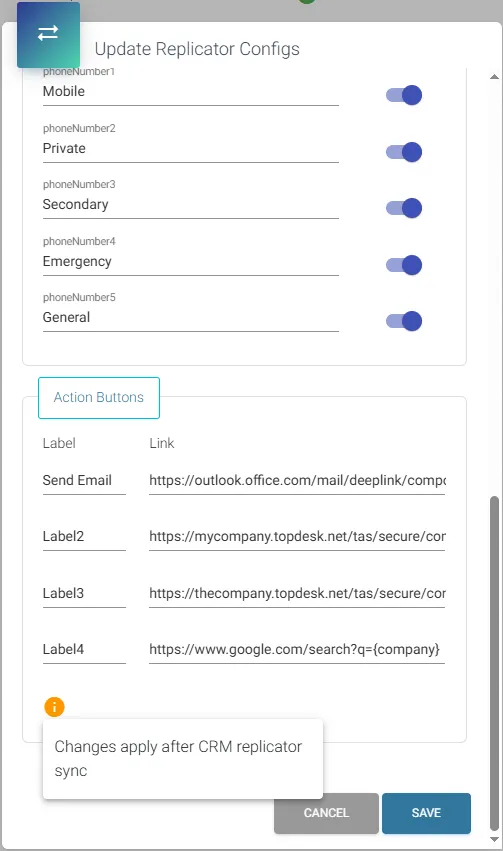
- Labels – visible in the Agent Assist label (name) for the action button.
- Link – URL address which redirects an agent upon pressing on correlating label in Agent Assist.
- Custom CRM Connector
Labels for the action buttons must be defined in ROGER365.io admin portal:
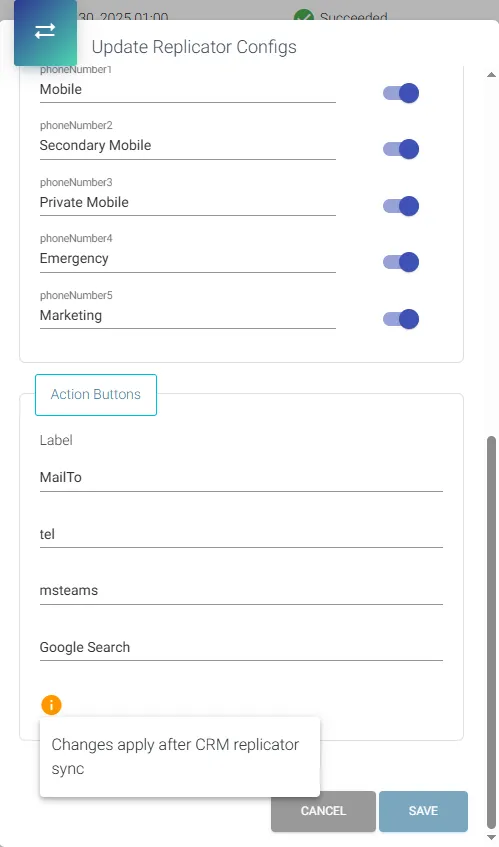
Links in case of Custom CRM Connectors shall be configured in the .csv upload template under ActionLink0 (to 3) columns!