


Search
Reject
Transfer
Merge
Play Audio Prompt
DTMF
Disconnect
The basics
Shift Synchronization
Power Frame
Create App Registration for Attendant Console
Callback request
Force terminate
Supervisor Assist
Redirect
Virtual wait
Conference call
Outbound DTMF
Cancel consultative transfer
Call Park
Features
Smart Chatbot
Microsoft Power Automate
Phonebook
Sentiment Analytics
TouchPoint
Agent
Reporting
Supervisor
Agent
Obtaining a WhatsApp number
What to do next?
Signup & Enrollment
Summary Export
ReplicatorConfig
ReplicatorJobStatus
TouchPoints
Chatbot Languages
Chatbot Knowledgebases
Tenant Information
Subscription
Conversation Packs
Conversations
Messages
Toastar Users
Toastar Conversations
Teams
WhatsAppConsent
API TouchPoint
Campaign API
Transcript
FeedbackExport
Outbound Call Campaign
Webhooks
Agent EventLog
Agent workEntry
Call Stream Change
Execution Results
Request
Queues
Calls
Agent Export
CallParticipants
API Documentation
ToastarForTeams
Callback Requests
Conversation API
Classification API
General Prerequisites
Contact Center
Setup Access & Security
Schedules
Resource Accounts
Queues
Callflows
Audio Files
Agents
Logging
Audit
CRM
Languages
Create Tenant App
Getting started
Subscriptions
Call Flows
AI Flow
Copilot Touchpoint
Insights & Analytics
Wallboard
Permissions
Logging
CRM Calling Integration (Toastar)
Custom CRM Connector
Default CRM Connectors
CRM Replicator
Email Configuration
Schedules
Agent Assist
Setup Access & Security
Malicious File Blocking
Wallboard
Reporting
Messages
Examples
Graphical Designer
Using the library
Email Touchpoint
API TouchPoint
Facebook TouchPoint
SMS TouchPoint
WhatsApp for Business TouchPoint
Webchat TouchPoint
Microsoft Teams
Queues
AI Flow (Beta)
Classification
Skill Based Routing
Reason Codes
Audio Prompts
Agent Profiles
Agents
Call Park
Resource Accounts
Graphical Designer
Form Based callflow
Using the library
Queues
General
Agent page functionalities
Social Messaging
Contact Center
Support & Assistance
Compliance by design
Social Messaging
Contact Center
Getting Started
General
No results
Try a different search query
Skill Based Routing

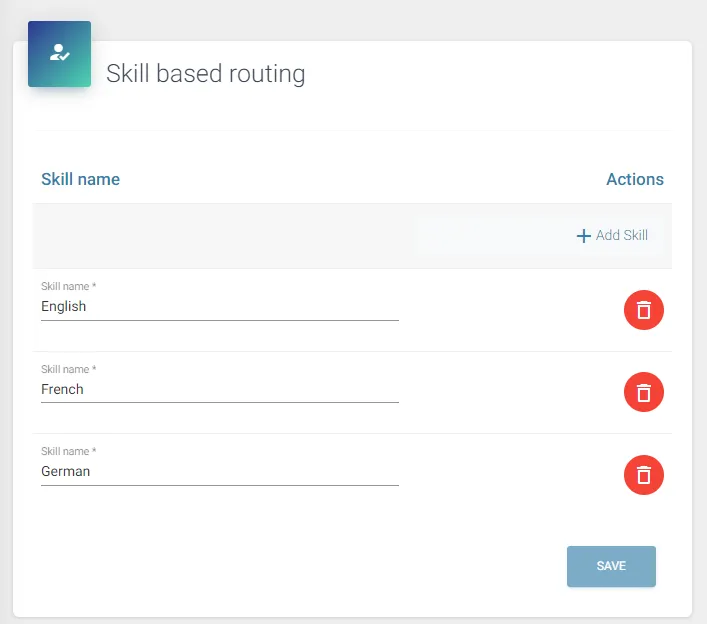
To route incoming calls to an agent with the highest skill on a certain subject, you can use the Skill Based Routing Method. The following steps are required:
- Create the skills (see underneath)
- At the Agents configuration, add the skills and the agents’ skill level to the agent
- Enable Skill Based Routing at the queue configuration and select the skills required for the queue
Example Algorithm: Skill-Based Routing
Consider a queue configured with serial and skill-based routing, containing a skill named 'A':
- Agent 1: Skill 'A', Value: 100
- Agent 2: Skill 'A', Value: 100
- Agent 3: Skill 'A', Value: 50
The routing process proceeds as follows:
- A call comes in. The system selects from agents not yet called (called: none) with the highest available skill level for A (100), resulting in Agent 1 and Agent 2. Due to serial routing, Agent 1 receives the call.
- Agent 1 does not answer.
- The system selects from agents not yet called (called: 1) with the highest available skill level for A (100), resulting in Agent 2. Due to serial routing, Agent 2 receives the call.
- Agent 2 does not answer.
- The system selects from agents not yet called (called: 1, 2) with the highest available skill level for A (50), resulting in Agent 3. Due to serial routing, Agent 3 receives the call.
- Agent 3 does not answer.
- The system selects from agents not yet called (called: 1, 2, 3) — none remain, so the list resets — with the highest available skill level for A (100), resulting in Agent 1 and Agent 2. Due to serial routing, Agent 1 receives the call.
- This process repeats as needed.
When a queue is configured with multiple skills, skill levels are not summed but treated as equal. For example, in a queue requiring skills A and B, an agent with Skill A at value 100 is considered equivalent to an agent with Skill B at value 100