


The basics

Next to various types of actions, there are a couple of basic elements you must or can use in every flow. Those are described underneath using this example.
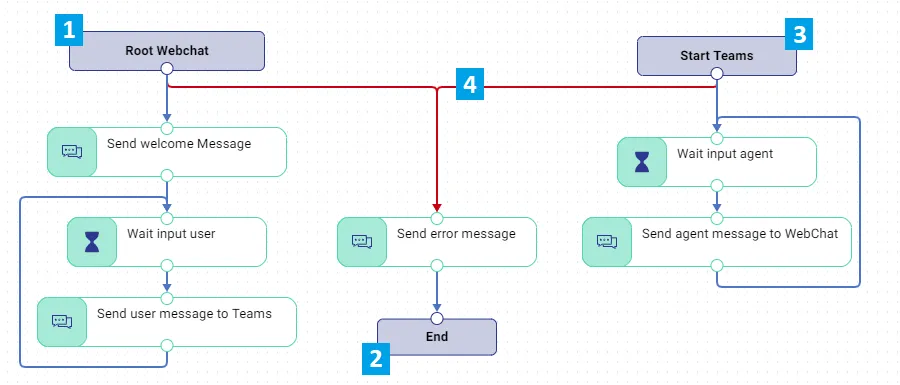
1. Root Node
Every flow starts with a ‘Root’ node and it’s by default shown when you create a new flow. This node represents the starting point of the conversation flow, for example a webchat TouchPoint. On the root properties panel you can select the starting TouchPoint. From the node you can create three types of links:
- Any: This link is followed by default
- Closed: This link will be followed when a close event (for example user closed the webchat or a Teams agent closes the conversation) occurs.
- Error: This link will be followed when conversation broke due to issue in configuration.
2. End Node
When the conversation of flow is completed, the end node is reached. This is also a mandatory element to end the active flow. Sometimes the End node must be connected to multiple other actions, in such case you can use Merge action.
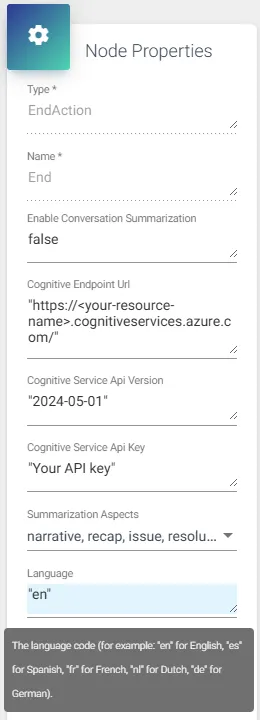
The End node allows you to configure AI-powered summarization based on the transcript of a social conversation. Available summary aspects include Recap, Narrative, Issue, Resolution, and Follow-up Tasks (availability depends on the API version; not all aspects may be supported). An administrator must complete the configuration using a previously created AI Service endpoint that supports AI summarization. A language code is required; if none is provided, Dutch will be used by default. Once the configuration is complete, set the “Enable Conversation Summarization” property should be changed from “false” to “true”. The generated AI summaries are available in the corresponding social interaction record in Agent Assist.
3. Start Node
A conversation is always initiated in the Root Node, but may touch (multiple) other TouchPoints. For example: the Root starts at a Webchat TouchPoint but can be routed to a Microsoft Teams Channel. This Channel/TouchPoint then will be a Start Node. You could have multiple Start Nodes, for example when you use a choice action to let the user select if he/she want to chat with a salesteam channel or a supportteam channel.
4. Error Node
When an action experiences an error, it will first look for a local error link. All actions can have an individual error link. If such a link is not found, it will look for a global error link (from the root/start node). Always define a global error as shown in the example above.