Search
Callback request
Setup - Contact Center
General
Callback request
Read more
Force terminate
How to use
Agent page functionalities
Force terminate
Read more
Supervisor Assist
How to use
Agent page functionalities
Supervisor Assist
Read more
Redirect
How to use
Agent page functionalities
Redirect
Read more
Virtual wait
How to use
Agent page functionalities
Virtual wait
Read more
Conference call
How to use
Agent page functionalities
Conference call
Read more
Outbound DTMF
How to use
Agent page functionalities
Outbound DTMF
Read more
Cancel consultative transfer
How to use
Agent page functionalities
Cancel consultative transfer
Read more
Call Park
How to use
Agent page functionalities
Call Park
Read more
Features
How to use
Social Messaging
Features
Read more
Smart Chatbot
How to use
Social Messaging
Smart Chatbot
Read more
Microsoft Power Automate
How to use
Social Messaging
Microsoft Power Automate
Read more
Phonebook
How to use
Social Messaging
Phonebook
Read more
Sentiment Analytics
How to use
Social Messaging
Sentiment Analytics
Read more
TouchPoint
How to use
Social Messaging
TouchPoint
Read more
Agent
How to use
Social Messaging
Agent
Read more
Reporting
How to use
Contact Center
Reporting
Read more
Supervisor
How to use
Contact Center
Supervisor
Read more
Agent
How to use
Contact Center
Agent
Read more
Obtaining a WhatsApp number
Getting Started
Support & Assistance
Obtaining a WhatsApp number
Read more
What to do next?
Getting Started
Getting Started
What to do next?
Read more
Signup & Enrollment
Getting Started
Getting Started
Signup & Enrollment
Read more
Summary Export
API
Social Messaging
Summary Export
Read more
ReplicatorConfig
API
Social Messaging
ReplicatorConfig
Read more
ReplicatorJobStatus
API
Social Messaging
ReplicatorJobStatus
Read more
TouchPoints
API
Social Messaging
TouchPoints
Read more
Chatbot Languages
API
Social Messaging
Chatbot Languages
Read more
Chatbot Knowledgebases
API
Social Messaging
Chatbot Knowledgebases
Read more
Tenant Information
API
Social Messaging
Tenant Information
Read more
Subscription
API
Social Messaging
Subscription
Read more
Conversation Packs
API
Social Messaging
Conversation Packs
Read more
Conversations
API
Social Messaging
Conversations
Read more
Messages
API
Social Messaging
Messages
Read more
Toastar Users
API
Social Messaging
Toastar Users
Read more
Toastar Conversations
API
Social Messaging
Toastar Conversations
Read more
Teams
API
Social Messaging
Teams
Read more
WhatsAppConsent
API
Social Messaging
WhatsAppConsent
Read more
API TouchPoint
API
Social Messaging
API TouchPoint
Read more
Campaign API
API
Social Messaging
Campaign API
Read more
Transcript
API
Social Messaging
Transcript
Read more
FeedbackExport
API
Contact Center
FeedbackExport
Read more
Outbound Call Campaign
API
Contact Center
Outbound Call Campaign
Read more
Webhooks
API
Contact Center
Webhooks
Read more
Agent EventLog
API
Contact Center
Agent EventLog
Read more
Agent workEntry
API
Contact Center
Agent workEntry
Read more
Call Stream Change
API
Contact Center
Call Stream Change
Read more
Execution Results
API
Contact Center
Execution Results
Read more
Request
API
Contact Center
Request
Read more
Queues
API
Contact Center
Queues
Read more
Calls
API
Contact Center
Calls
Read more
Agent Export
API
Contact Center
Agent Export
Read more
CallParticipants
API
Contact Center
CallParticipants
Read more
API Documentation
API
Contact Center
API Documentation
Read more
ToastarForTeams
API
General
ToastarForTeams
Read more
Callback Requests
API
General
Callback Requests
Read more
Conversation API
API
General
Conversation API
Read more
Classification API
API
General
Classification API
Read more
General Prerequisites
Getting Started
Getting Started
General Prerequisites
Read more
Contact Center
How to use
Contact Center
Read more
Setup Access & Security
Setup - General
Setup Access & Security
Read more
Schedules
Setup - Contact Center
Schedules
Read more
Resource Accounts
Setup - Contact Center
Resource Accounts
Read more
Queues
Setup - Contact Center
Queues
Read more
Callflows
Setup - Contact Center
Callflows
Read more
Audio Files
Setup - Contact Center
Audio Files
Read more
Agents
Setup - Contact Center
Agents
Read more
Logging
How to use
Logging
Read more
Audit
Setup - General
Audit
Read more
CRM
Setup - General
CRM
Read more
Languages
Setup - General
Languages
Read more
Create Tenant App
Setup - General
Create Tenant App
Read more
Getting started
Getting started
Getting started
Read more
Subscriptions
How to use
Subscriptions
Read more
Call Flows
Setup - Contact Center
Call Flows
Read more
AI Flow
API
AI Flow
Read more
Copilot Touchpoint
Setup - Social Messaging
Copilot Touchpoint
Read more
Insights & Analytics
Setup - General
Insights & Analytics
Read more
Wallboard
Setup - General
Wallboard
Read more
Permissions
Setup - General
Permissions
Read more
Logging
Setup - General
Logging
Read more
CRM Calling Integration (Toastar)
Setup - General
CRM Calling Integration (Toastar)
Read more
Custom CRM Connector
Setup - General
Custom CRM Connector
Read more
Default CRM Connectors
Setup - General
Default CRM Connectors
Read more
CRM Replicator
Setup - General
CRM Replicator
Read more
Email Configuration
Setup - General
Email Configuration
Read more
Schedules
Setup - General
Schedules
Read more
Agent Assist
Setup - General
Agent Assist
Read more
Setup Access & Security
Setup - General
Setup Access & Security
Read more
Malicious File Blocking
Setup - Social Messaging
Malicious File Blocking
Read more
Wallboard
Setup - Social Messaging
Wallboard
Read more
Reporting
Setup - Social Messaging
Reporting
Read more
Messages
Setup - Social Messaging
Messages
Read more
Examples
Setup - Social Messaging
Examples
Read more
Graphical Designer
Setup - Social Messaging
Graphical Designer
Read more
Using the library
Setup - Social Messaging
Using the library
Read more
Email Touchpoint
Setup - Social Messaging
Email Touchpoint
Read more
API TouchPoint
Setup - Social Messaging
API TouchPoint
Read more
Facebook TouchPoint
Setup - Social Messaging
Facebook TouchPoint
Read more
SMS TouchPoint
Setup - Social Messaging
SMS TouchPoint
Read more
WhatsApp for Business TouchPoint
Setup - Social Messaging
WhatsApp for Business TouchPoint
Read more
Webchat TouchPoint
Setup - Social Messaging
Webchat TouchPoint
Read more
Microsoft Teams
Setup - Social Messaging
Microsoft Teams
Read more
Queues
Setup - Social Messaging
Queues
Read more
AI Flow (Beta)
Setup - Contact Center
AI Flow (Beta)
Read more
Classification
Setup - Contact Center
Classification
Read more
Skill Based Routing
Setup - Contact Center
Skill Based Routing
Read more
Reason Codes
Setup - Contact Center
Reason Codes
Read more
Audio Prompts
Setup - Contact Center
Audio Prompts
Read more
Agent Profiles
Setup - Contact Center
Agent Profiles
Read more
Agents
Setup - Contact Center
Agents
Read more
Call Park
Setup - General
Call Park
Read more
Resource Accounts
Setup - Contact Center
Resource Accounts
Read more
Graphical Designer
Setup - Contact Center
Graphical Designer
Read more
Form Based callflow
Setup - Contact Center
Form Based callflow
Read more
Using the library
Setup - Contact Center
Using the library
Read more
Queues
Setup - Contact Center
Queues
Read more
General
Setup - Contact Center
General
Read more
Agent page functionalities
How to use
Agent page functionalities
Read more
Social Messaging
How to use
Social Messaging
Read more
Contact Center
How to use
Contact Center
Read more
Support & Assistance
Getting Started
Support & Assistance
Read more
Compliance by design
Getting Started
Compliance by design
Read more
Social Messaging
API
Social Messaging
Read more
Contact Center
API
Contact Center
Read more
Getting Started
Getting Started
Getting Started
Read more
General
API
General
Read more
No results
Try a different search query
Menu
Thank you! Your submission has been received!
Oops! Something went wrong while submitting the form.
What are you looking for?
Setup - Contact Center
Graphical Designer
OpenAI

OpenAI

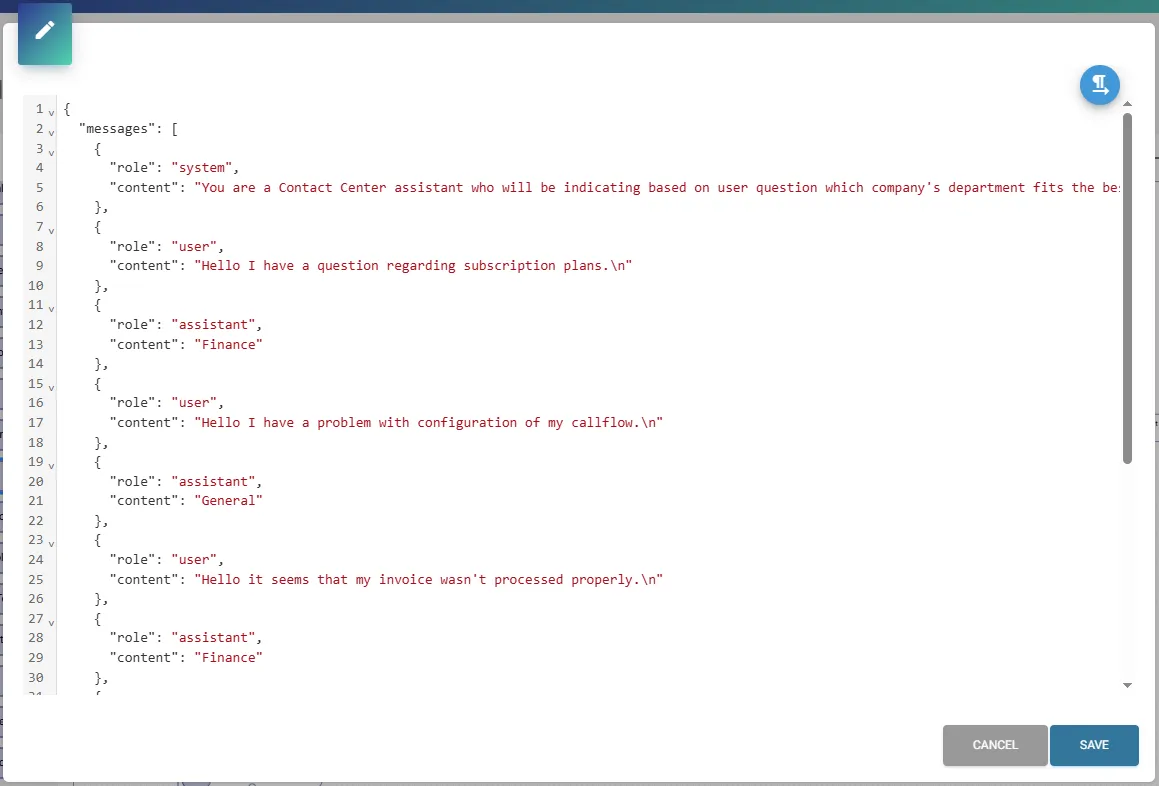
Edit JSON Content overview:

This feature is only available in the Enterprise subscription.

Before configuring this action you have to create Azure OpenAI resource at Microsoft Azure, you can find description in this Microsoft article – Create and deploy an Azure OpenAI Service resource.
Most of the configuration part must be done in Microsoft Foundry portal.

Microsoft Azure OpenAI is a preview feature, please be aware of unexpected results, and test thoroughly before implementing to production environment.

Description

Component Description
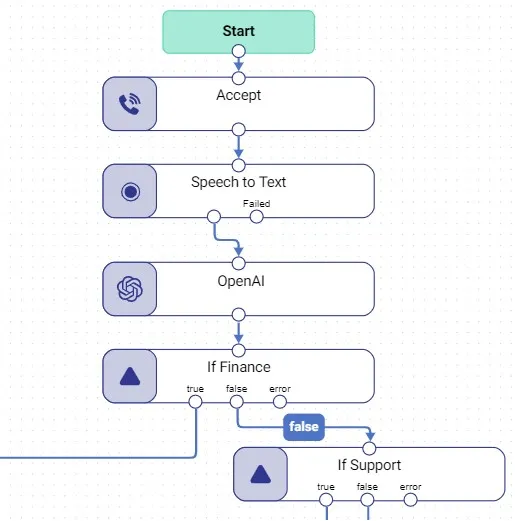
OpenAI Action for implement advanced Microsoft Azure OpenAI feature.

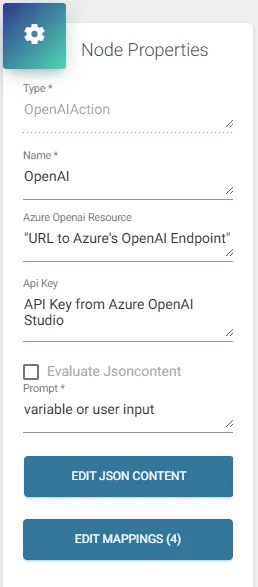
Node Properties

Node Properties Description Input type
Azure OpenAI resource URL address (Endpoint) of your Azure OpenAI resource. Depending on used SDK, the URL address should look following:
Azure OpenAI SDK = “https://{ResourceName}.openai.azure.com/openai/deployments/{ModelDeploymentName}/chat/completions?api-version=2025-01-01-preview”
OpenAI SDK = “https://{ResourceName}.openai.azure.com/openai/v1/chat/completions”
Note: API version for “Azure OpenAI SDK” can always change, check out your OpenAI resource at Microsoft Foundry portal.
String
API Key API Key of your Azure OpenAI resource (without the quotes). String
Evaluate Jsoncontent The value in JSON Content will be evaluated when this is checked. If the JSON Content is evaluated, it should also contain the prompt itself. Using evaluation, the resulting JSON can be altered in more ways than just the prompt field. Checkbox
Prompt The prompt(s) to generate completions for, or use variable for inputting user’s text which model will response to according to JSON Content. String
Edit JSON Content Copy Samle JSON Code from Microsoft Foundry with configured Chat completion method. Preferably it should contain prompt (instruction) for OpenAI’s model. When evaluated, the resulting string should be valid JSON, thus, double quotes should be escaped and variables used, should not contain unescaped quotes as values. Ex: “{\”property\”:\””+variable.Text+”\”}”, where variable.Text should not contain any “.
Notes: In case of using “OpenAI SDK”, the JSON Content must include “model” property – for instance: \”model\”: \”gpt-5-nano\”.
JSON editor may show that provided JSON is incorrect, this message is informational and can be disregarded as far as the action itself does work.
String or variable*

* Variable in JSON Content can be used when Evaluate Jsoncontent option is enabled.
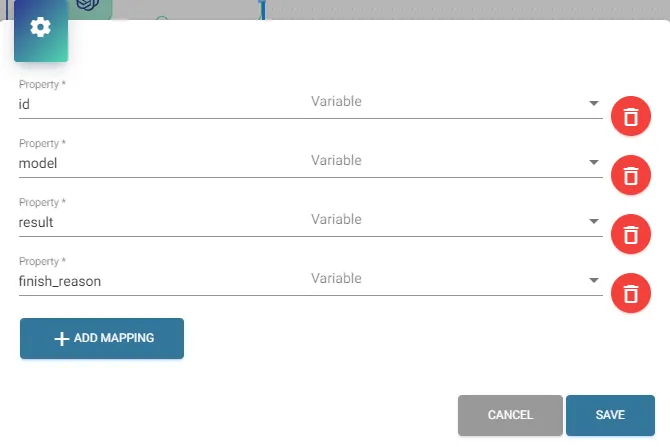
Mapping

Mapping Description Value
id Select string variable to request information about the unique identifier associated with this completions response. Select from list
model Select string variable to request information about OpenAI’s machine learning model. Select from list
result Select string variable for mapping model’s response. Select from list
finish_reason Select string variable for mapping model’s finish reason. Select from list

Setting up variable for result property is mandatory for action to work!
On this page