


Force terminate

Force terminate
It is possible to force the termination of a call from the Supervisor page. This option is extremely useful in cases where there are issues with a call, for instance when everyone has finished the call, but for some reason, the Agent’s status still appears as Busy, or the call is stuck in the Queue where none of the agents is able to answer or even the call record itself is still visible in the ‘Live calls’ section of the Supervisor page. Before using this option, it needs to be enabled on the Queues admin page for the selected Queue Supervisors.
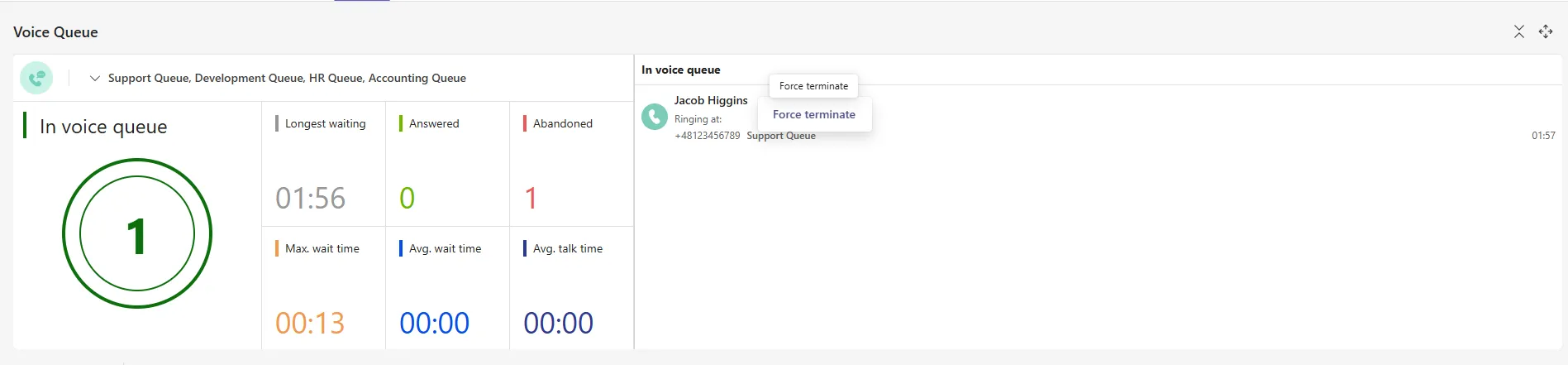
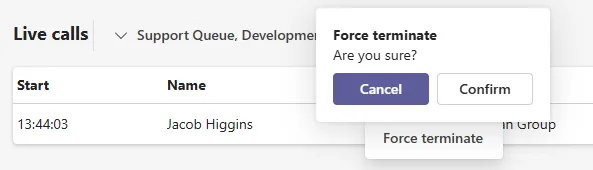
A call that requires force termination needs to be located in the Voice Queue or Live calls section of the Supervisor page. Next, the agent needs to right-click on the call record. This action will display the “Force Terminate” button. Upon pressing it, a confirmation window will appear. Pressing “Confirm” will terminate the call.
Each force terminating a call by Supervisor is logged into Logging page of ROGER365 admin portal.