


Logging

The Logging page provides a central overview of all warnings and errors that occur on the platform, allowing administrators to review issues and troubleshoot them. You can find this page under the Contact Center section in the left-hand menu.
Understanding the page
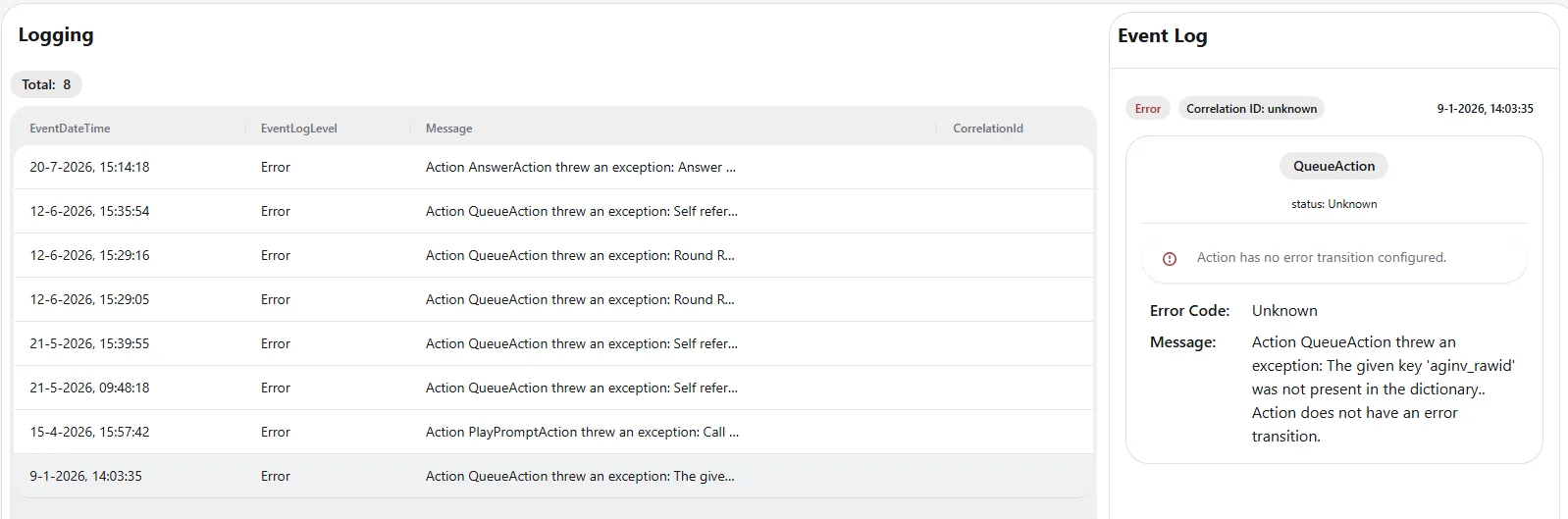
The page is divided into two areas: the log list on the left and the Event Log detail panel on the right.
Log list
The counter at the top shows the total number of log entries (in this example, 8). Each entry is listed in a table with the following columns:
- EventDateTime – The date and time the event occurred.
- EventLogLevel – The severity of the entry, such as Error or Warning.
- Message – A summary of the event. Longer messages are truncated; select the entry to view the full details.
- CorrelationId – The correlation ID used to link related events, which is helpful when tracing an issue across the platform.
Event Log detail panel
Click an entry in the log list to view its full details in the Event Log panel on the right. This panel shows:
- The log level (for example, Error) and the correlation ID, along with the date and time of the event.
- The action involved (for example, QueueAction) and its status.
- Any additional context, such as a note that the action has no error transition configured.
- Error Code – The error code associated with the event.
- Message – The full error message, describing what went wrong.
Using this information, administrators can identify the cause of each warning or error and take the appropriate action to resolve it.