


Search
Example PowerShell script
Setup - General
CRM
Example PowerShell script
Text Link
Statistics
How to use
Contact Center
Statistics
Text Link
Supervisor
How to use
Contact Center
Supervisor
Text Link
Agent
How to use
Contact Center
Agent
Text Link
Contact Center
How to use
Contact Center
Text Link
Setup Access & Security
Setup - General
Setup Access & Security
Text Link
Schedules
Setup - Contact Center
Schedules
Text Link
Resource Accounts
Setup - Contact Center
Resource Accounts
Text Link
Queues
Setup - Contact Center
Queues
Text Link
Callflows
Setup - Contact Center
Callflows
Text Link
Audio Files
Setup - Contact Center
Audio Files
Text Link
Agents
Setup - Contact Center
Agents
Text Link
Logging
How to use
Logging
Text Link
Audit
Setup - General
Audit
Text Link
CRM
Setup - General
CRM
Text Link
Languages
Setup - General
Languages
Text Link
Create Tenant App
Setup - General
Create Tenant App
Text Link
Getting started
Getting started
Getting started
Text Link
Subscriptions
How to use
Subscriptions
Text Link
Call Flows
Setup - Contact Center
Call Flows
Text Link
AI Flow
API
AI Flow
Text Link
Copilot Touchpoint
Setup - Social Messaging
Copilot Touchpoint
Text Link
Insights & Analytics
Setup - General
Insights & Analytics
Text Link
Wallboard
Setup - General
Wallboard
Text Link
Permissions
Setup - General
Permissions
Text Link
Logging
Setup - General
Logging
Text Link
CRM Calling Integration (Toastar)
Setup - General
CRM Calling Integration (Toastar)
Text Link
Custom CRM Connector
Setup - General
Custom CRM Connector
Text Link
Default CRM Connectors
Setup - General
Default CRM Connectors
Text Link
CRM Replicator
Setup - General
CRM Replicator
Text Link
Email Configuration
Setup - General
Email Configuration
Text Link
Schedules
Setup - General
Schedules
Text Link
Agent Assist
Setup - General
Agent Assist
Text Link
Setup Access & Security
Setup - General
Setup Access & Security
Text Link
Malicious File Blocking
Setup - Social Messaging
Malicious File Blocking
Text Link
Wallboard
Setup - Social Messaging
Wallboard
Text Link
Reporting
Setup - Social Messaging
Reporting
Text Link
Messages
Setup - Social Messaging
Messages
Text Link
Examples
Setup - Social Messaging
Examples
Text Link
Graphical Designer
Setup - Social Messaging
Graphical Designer
Text Link
Using the library
Setup - Social Messaging
Using the library
Text Link
Email Touchpoint
Setup - Social Messaging
Email Touchpoint
Text Link
API TouchPoint
Setup - Social Messaging
API TouchPoint
Text Link
Facebook TouchPoint
Setup - Social Messaging
Facebook TouchPoint
Text Link
SMS TouchPoint
Setup - Social Messaging
SMS TouchPoint
Text Link
WhatsApp for Business TouchPoint
Setup - Social Messaging
WhatsApp for Business TouchPoint
Text Link
Webchat TouchPoint
Setup - Social Messaging
Webchat TouchPoint
Text Link
Microsoft Teams
Setup - Social Messaging
Microsoft Teams
Text Link
Queues
Setup - Social Messaging
Queues
Text Link
AI Flow (Beta)
Setup - Contact Center
AI Flow (Beta)
Text Link
Classification
Setup - Contact Center
Classification
Text Link
Skill Based Routing
Setup - Contact Center
Skill Based Routing
Text Link
Reason Codes
Setup - Contact Center
Reason Codes
Text Link
Audio Prompts
Setup - Contact Center
Audio Prompts
Text Link
Agent Profiles
Setup - Contact Center
Agent Profiles
Text Link
Agents
Setup - Contact Center
Agents
Text Link
Call Park
Setup - General
Call Park
Text Link
Resource Accounts
Setup - Contact Center
Resource Accounts
Text Link
Graphical Designer
Setup - Contact Center
Graphical Designer
Text Link
Form Based callflow
Setup - Contact Center
Form Based callflow
Text Link
Using the library
Setup - Contact Center
Using the library
Text Link
Queues
Setup - Contact Center
Queues
Text Link
General
Setup - Contact Center
General
Text Link
Agent page functionalities
How to use
Agent page functionalities
Text Link
Social Messaging
How to use
Social Messaging
Text Link
Contact Center
How to use
Contact Center
Text Link
Support & Assistance
Getting Started
Support & Assistance
Text Link
Compliance by design
Getting Started
Compliance by design
Text Link
Social Messaging
API
Social Messaging
Text Link
Contact Center
API
Contact Center
Text Link
Getting Started
Getting Started
Getting Started
Text Link
General
API
General
Text Link
No results
Try a different search query
Menu
Thank you! Your submission has been received!
Oops! Something went wrong while submitting the form.
What are you looking for?
Getting started
How to use
Setup - General
Setup - Contact Center

Supervisor

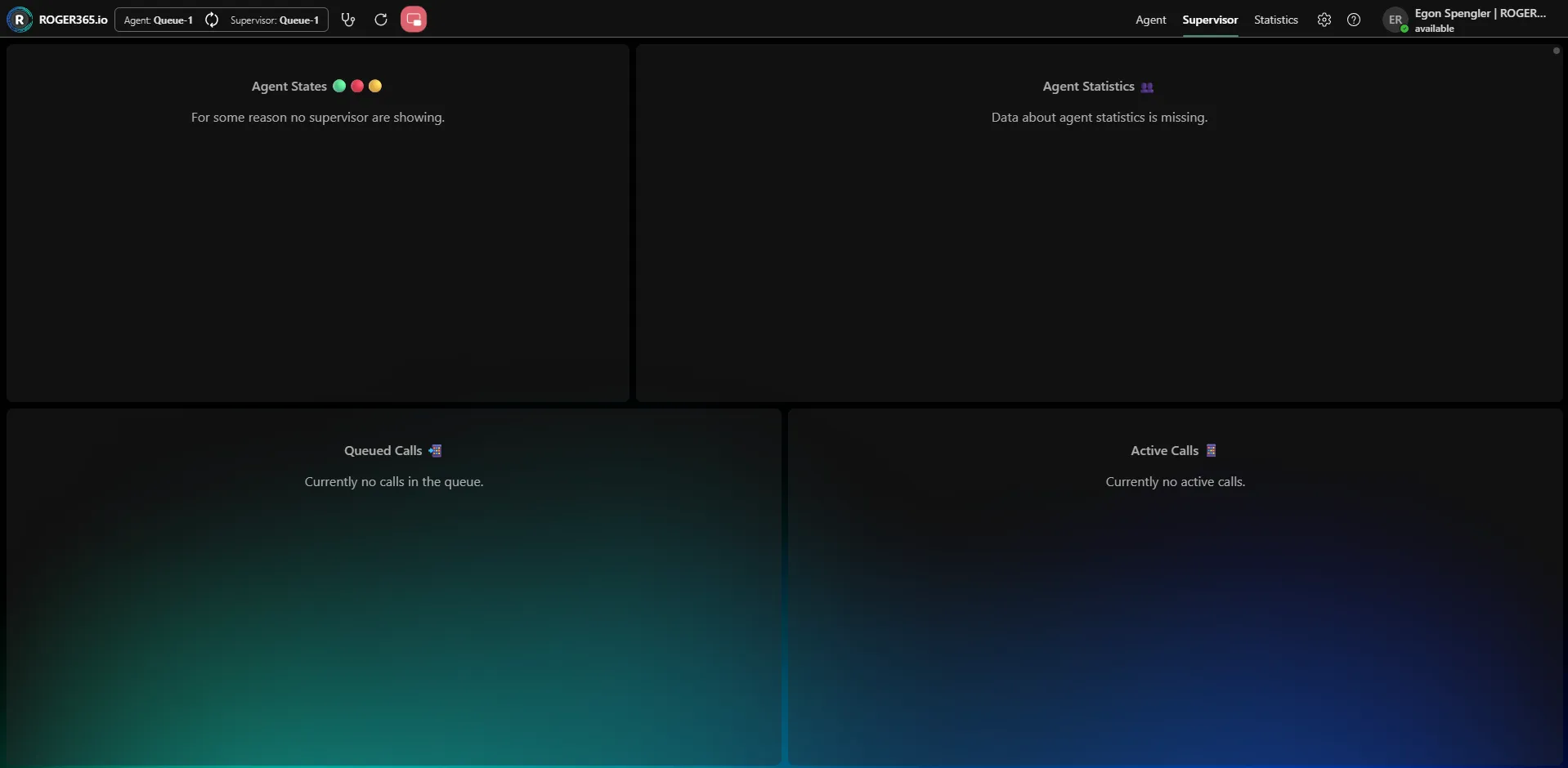
The Supervisor screen gives supervisors a real-time overview of their team's activity and the calls flowing through the queue. It allows supervisors to monitor agent availability, review performance, and keep track of both queued and active calls. You can access it by clicking Supervisor in the top navigation bar.
Visible only if you have supervisor rights.

Agent States

This panel shows the current status of each agent in the queue, indicated by colored markers—for example, green for available, red for busy or unavailable, and yellow for away. This gives supervisors an at-a-glance view of who is ready to take calls. When no agent states are available, a message indicates that none are showing. Supervisors can force-change the status of an agent, when they are not on a call.

Agent Statistics

This panel displays performance statistics for each agent, helping supervisors track how their team is handling calls. When no data is available, a message indicates that agent statistics are missing.

Queued Calls

This panel lists the calls currently waiting in the queue, so supervisors can see how many callers are waiting and for how long. When there are no waiting calls, a message indicates that there are currently no calls in the queue.

Active Calls

This panel lists the calls currently being handled by agents, giving supervisors visibility into ongoing conversations. When there are no calls in progress, a message indicates that there are currently no active calls. The supervisor can use the Join call button to silently join and listen/participate (your mic starts muted so you don't interrupt).

On this page