Search
Reject
Setup - Contact Center
Graphical Designer
Reject
Text Link
Transfer
Setup - Contact Center
Graphical Designer
Transfer
Text Link
Merge
Setup - Contact Center
Graphical Designer
Merge
Text Link
Play Audio Prompt
Setup - Contact Center
Graphical Designer
Play Audio Prompt
Text Link
DTMF
Setup - Contact Center
Graphical Designer
DTMF
Text Link
Disconnect
Setup - Contact Center
Graphical Designer
Disconnect
Text Link
The basics
Setup - Contact Center
Graphical Designer
The basics
Text Link
Shift Synchronization
Setup - Contact Center
Queues
Shift Synchronization
Text Link
Power Frame
Setup - Contact Center
Queues
Power Frame
Text Link
Create App Registration for Attendant Console
Setup - Contact Center
General
Create App Registration for Attendant Console
Text Link
Callback request
Setup - Contact Center
General
Callback request
Text Link
Force terminate
How to use
Agent page functionalities
Force terminate
Text Link
Supervisor Assist
How to use
Agent page functionalities
Supervisor Assist
Text Link
Redirect
How to use
Agent page functionalities
Redirect
Text Link
Virtual wait
How to use
Agent page functionalities
Virtual wait
Text Link
Conference call
How to use
Agent page functionalities
Conference call
Text Link
Outbound DTMF
How to use
Agent page functionalities
Outbound DTMF
Text Link
Cancel consultative transfer
How to use
Agent page functionalities
Cancel consultative transfer
Text Link
Call Park
How to use
Agent page functionalities
Call Park
Text Link
Features
How to use
Social Messaging
Features
Text Link
Smart Chatbot
How to use
Social Messaging
Smart Chatbot
Text Link
Microsoft Power Automate
How to use
Social Messaging
Microsoft Power Automate
Text Link
Phonebook
How to use
Social Messaging
Phonebook
Text Link
Sentiment Analytics
How to use
Social Messaging
Sentiment Analytics
Text Link
TouchPoint
How to use
Social Messaging
TouchPoint
Text Link
Agent
How to use
Social Messaging
Agent
Text Link
Reporting
How to use
Contact Center
Reporting
Text Link
Supervisor
How to use
Contact Center
Supervisor
Text Link
Agent
How to use
Contact Center
Agent
Text Link
Obtaining a WhatsApp number
Getting Started
Support & Assistance
Obtaining a WhatsApp number
Text Link
What to do next?
Getting Started
Getting Started
What to do next?
Text Link
Signup & Enrollment
Getting Started
Getting Started
Signup & Enrollment
Text Link
Summary Export
API
Social Messaging
Summary Export
Text Link
ReplicatorConfig
API
Social Messaging
ReplicatorConfig
Text Link
ReplicatorJobStatus
API
Social Messaging
ReplicatorJobStatus
Text Link
TouchPoints
API
Social Messaging
TouchPoints
Text Link
Chatbot Languages
API
Social Messaging
Chatbot Languages
Text Link
Chatbot Knowledgebases
API
Social Messaging
Chatbot Knowledgebases
Text Link
Tenant Information
API
Social Messaging
Tenant Information
Text Link
Subscription
API
Social Messaging
Subscription
Text Link
Conversation Packs
API
Social Messaging
Conversation Packs
Text Link
Conversations
API
Social Messaging
Conversations
Text Link
Messages
API
Social Messaging
Messages
Text Link
Toastar Users
API
Social Messaging
Toastar Users
Text Link
Toastar Conversations
API
Social Messaging
Toastar Conversations
Text Link
Teams
API
Social Messaging
Teams
Text Link
WhatsAppConsent
API
Social Messaging
WhatsAppConsent
Text Link
API TouchPoint
API
Social Messaging
API TouchPoint
Text Link
Campaign API
API
Social Messaging
Campaign API
Text Link
Transcript
API
Social Messaging
Transcript
Text Link
FeedbackExport
API
Contact Center
FeedbackExport
Text Link
Outbound Call Campaign
API
Contact Center
Outbound Call Campaign
Text Link
Webhooks
API
Contact Center
Webhooks
Text Link
Agent EventLog
API
Contact Center
Agent EventLog
Text Link
Agent workEntry
API
Contact Center
Agent workEntry
Text Link
Call Stream Change
API
Contact Center
Call Stream Change
Text Link
Execution Results
API
Contact Center
Execution Results
Text Link
Request
API
Contact Center
Request
Text Link
Queues
API
Contact Center
Queues
Text Link
Calls
API
Contact Center
Calls
Text Link
Agent Export
API
Contact Center
Agent Export
Text Link
CallParticipants
API
Contact Center
CallParticipants
Text Link
API Documentation
API
Contact Center
API Documentation
Text Link
ToastarForTeams
API
General
ToastarForTeams
Text Link
Callback Requests
API
General
Callback Requests
Text Link
Conversation API
API
General
Conversation API
Text Link
Classification API
API
General
Classification API
Text Link
General Prerequisites
Getting Started
Getting Started
General Prerequisites
Text Link
Contact Center
How to use
Contact Center
Text Link
Setup Access & Security
Setup - General
Setup Access & Security
Text Link
Schedules
Setup - Contact Center
Schedules
Text Link
Resource Accounts
Setup - Contact Center
Resource Accounts
Text Link
Queues
Setup - Contact Center
Queues
Text Link
Callflows
Setup - Contact Center
Callflows
Text Link
Audio Files
Setup - Contact Center
Audio Files
Text Link
Agents
Setup - Contact Center
Agents
Text Link
Logging
How to use
Logging
Text Link
Audit
Setup - General
Audit
Text Link
CRM
Setup - General
CRM
Text Link
Languages
Setup - General
Languages
Text Link
Create Tenant App
Setup - General
Create Tenant App
Text Link
Getting started
Getting started
Getting started
Text Link
Subscriptions
How to use
Subscriptions
Text Link
Call Flows
Setup - Contact Center
Call Flows
Text Link
AI Flow
API
AI Flow
Text Link
Copilot Touchpoint
Setup - Social Messaging
Copilot Touchpoint
Text Link
Insights & Analytics
Setup - General
Insights & Analytics
Text Link
Wallboard
Setup - General
Wallboard
Text Link
Permissions
Setup - General
Permissions
Text Link
Logging
Setup - General
Logging
Text Link
CRM Calling Integration (Toastar)
Setup - General
CRM Calling Integration (Toastar)
Text Link
Custom CRM Connector
Setup - General
Custom CRM Connector
Text Link
Default CRM Connectors
Setup - General
Default CRM Connectors
Text Link
CRM Replicator
Setup - General
CRM Replicator
Text Link
Email Configuration
Setup - General
Email Configuration
Text Link
Schedules
Setup - General
Schedules
Text Link
Agent Assist
Setup - General
Agent Assist
Text Link
Setup Access & Security
Setup - General
Setup Access & Security
Text Link
Malicious File Blocking
Setup - Social Messaging
Malicious File Blocking
Text Link
Wallboard
Setup - Social Messaging
Wallboard
Text Link
Reporting
Setup - Social Messaging
Reporting
Text Link
Messages
Setup - Social Messaging
Messages
Text Link
Examples
Setup - Social Messaging
Examples
Text Link
Graphical Designer
Setup - Social Messaging
Graphical Designer
Text Link
Using the library
Setup - Social Messaging
Using the library
Text Link
Email Touchpoint
Setup - Social Messaging
Email Touchpoint
Text Link
API TouchPoint
Setup - Social Messaging
API TouchPoint
Text Link
Facebook TouchPoint
Setup - Social Messaging
Facebook TouchPoint
Text Link
SMS TouchPoint
Setup - Social Messaging
SMS TouchPoint
Text Link
WhatsApp for Business TouchPoint
Setup - Social Messaging
WhatsApp for Business TouchPoint
Text Link
Webchat TouchPoint
Setup - Social Messaging
Webchat TouchPoint
Text Link
Microsoft Teams
Setup - Social Messaging
Microsoft Teams
Text Link
Queues
Setup - Social Messaging
Queues
Text Link
AI Flow (Beta)
Setup - Contact Center
AI Flow (Beta)
Text Link
Classification
Setup - Contact Center
Classification
Text Link
Skill Based Routing
Setup - Contact Center
Skill Based Routing
Text Link
Reason Codes
Setup - Contact Center
Reason Codes
Text Link
Audio Prompts
Setup - Contact Center
Audio Prompts
Text Link
Agent Profiles
Setup - Contact Center
Agent Profiles
Text Link
Agents
Setup - Contact Center
Agents
Text Link
Call Park
Setup - General
Call Park
Text Link
Resource Accounts
Setup - Contact Center
Resource Accounts
Text Link
Graphical Designer
Setup - Contact Center
Graphical Designer
Text Link
Form Based callflow
Setup - Contact Center
Form Based callflow
Text Link
Using the library
Setup - Contact Center
Using the library
Text Link
Queues
Setup - Contact Center
Queues
Text Link
General
Setup - Contact Center
General
Text Link
Agent page functionalities
How to use
Agent page functionalities
Text Link
Social Messaging
How to use
Social Messaging
Text Link
Contact Center
How to use
Contact Center
Text Link
Support & Assistance
Getting Started
Support & Assistance
Text Link
Compliance by design
Getting Started
Compliance by design
Text Link
Social Messaging
API
Social Messaging
Text Link
Contact Center
API
Contact Center
Text Link
Getting Started
Getting Started
Getting Started
Text Link
General
API
General
Text Link
No results
Try a different search query
Menu
What are you looking for?
Thank you! Your submission has been received!
Oops! Something went wrong while submitting the form.
How to use
Setup - General
Getting started
Setup - Contact Center
Setup - General
Create Tenant App

Create Tenant App

To configure the portal and use the agent app, an app registration must be created in the customer's tenant. We have provided a PowerShell script for this, or you can follow the manual creation steps.

Option 1: Automated PowerShell Script (preferred)

Execute this PowerShell script (as Global Admin): Download Script

When the script has executed successfully, you must manually grant admin consent. Follow the instructions in the script.

Option 2: Manual Creation

  • Login to the Azure Portal via https://portal.azure.com
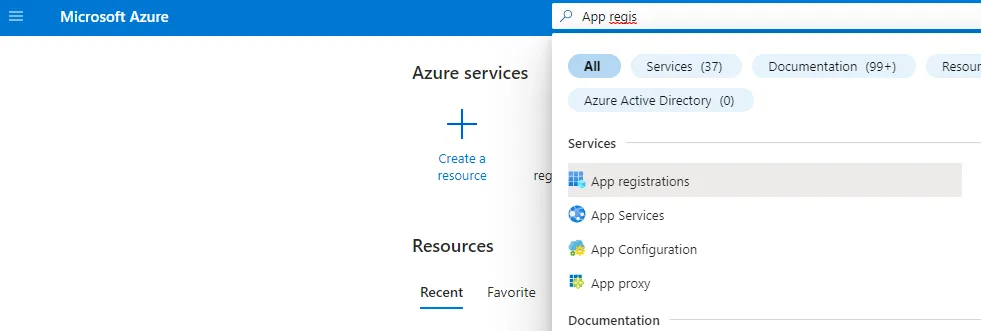
  • In the search bar on top, search for ‘App Registration’. Then click the found result ‘App registrations’
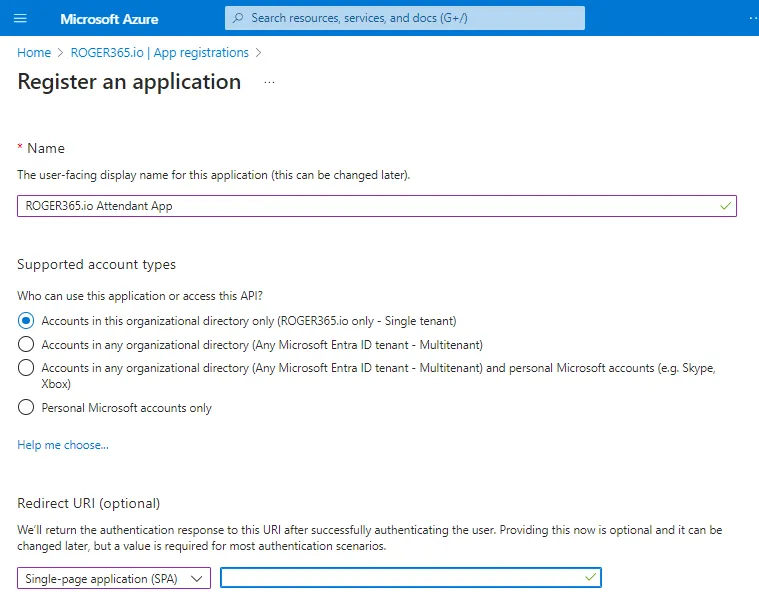
Enter a name

ROGER365.io UnifAI Attendant App

Choose

Accounts in this organizational directory only (ROGER365.io only – Single Tenant)

Redirect URL - Choose Single-page application (SPA) and provide following URLs

https://app.roger365.io
https://app.roger365.io/acs/agent
https://app.roger365.io/acs/auth-end
https://portal.roger365.io
https://portal.roger365.io/acs/auth-end

-> Now click the “REGISTER” button
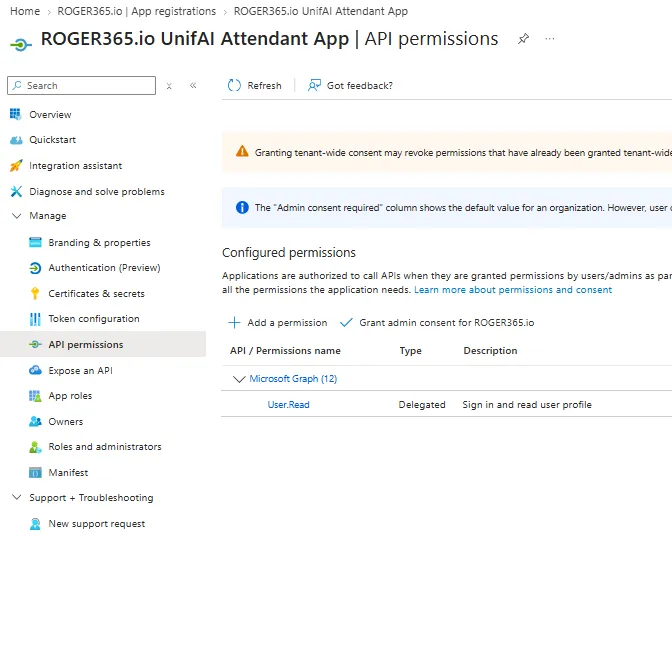
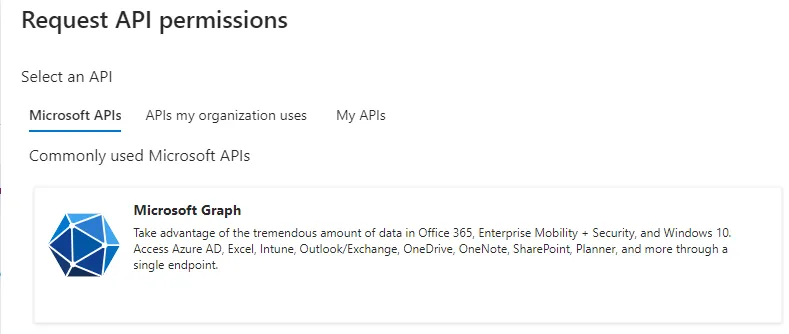
  • Then click “+ Add a permission”
  • Choose “Microsoft Graph”
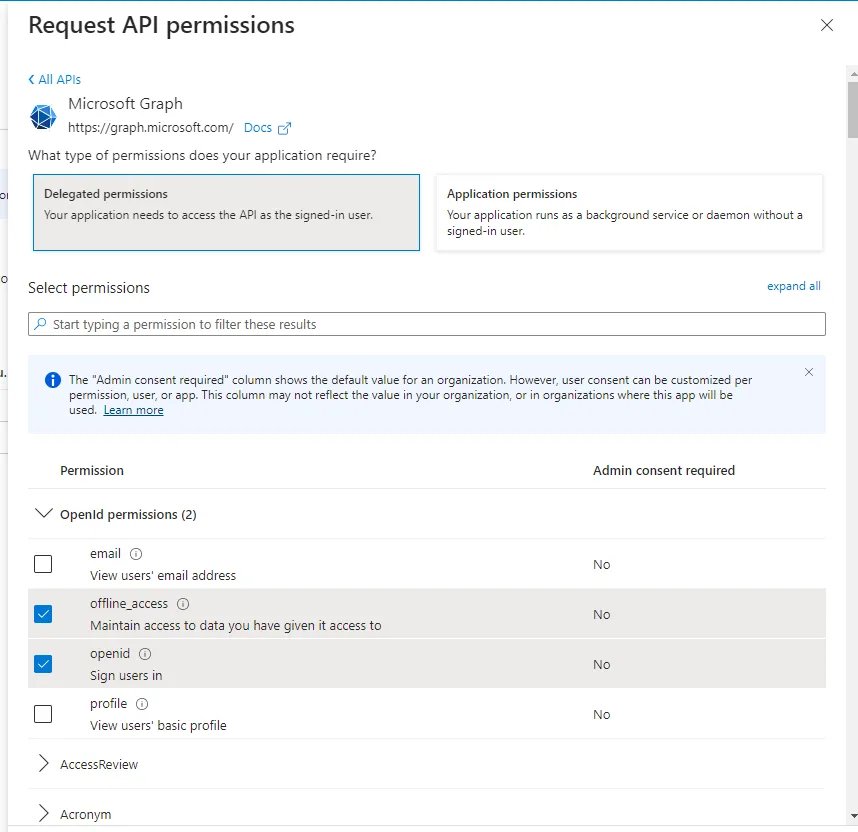
  • Choose Delegated Permissions and enable the following permissions:
    • OpenId Permissions
      offline_access
      openid
      profile
    • Calendars
      Calendars.Read
    • Contacts
      Contacts.Read
    • Group
      Group.Read.All
    • People
      People.Read
    • Presence
      Presence.Read.All
    • TeamsResourceAccount
      TeamsResourceAccount.Read.All
    • Users
      User.Read
      User.Read.All
      User.ReadBasic.All

Click the “Add Permission” button

Grant Admin Consent and Configure Appid
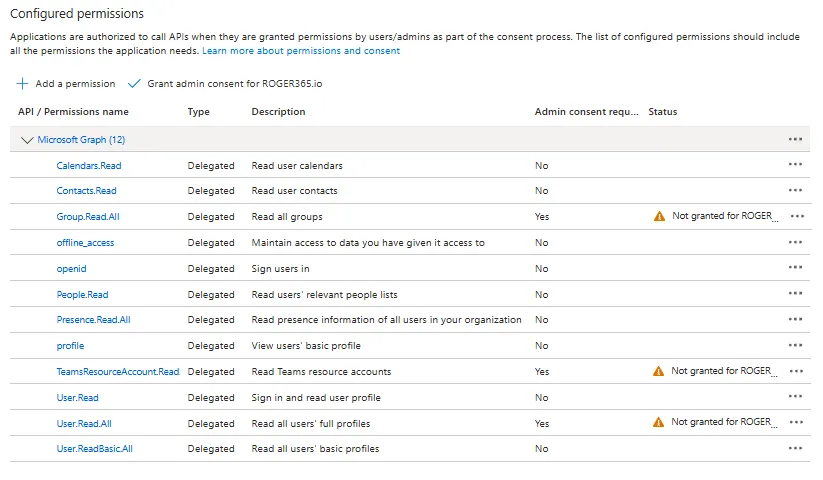
  • Click “Grant admin consent for ROGER365.io” and confirm with ‘Yes”
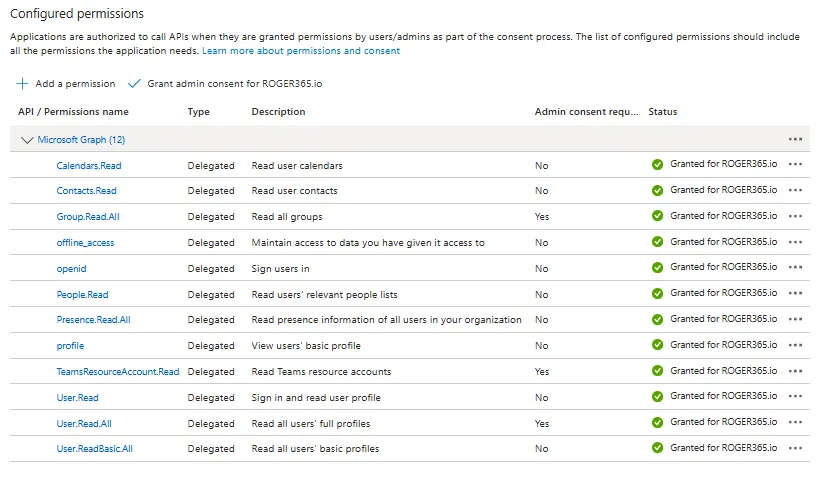
Now, all permissions should be granted
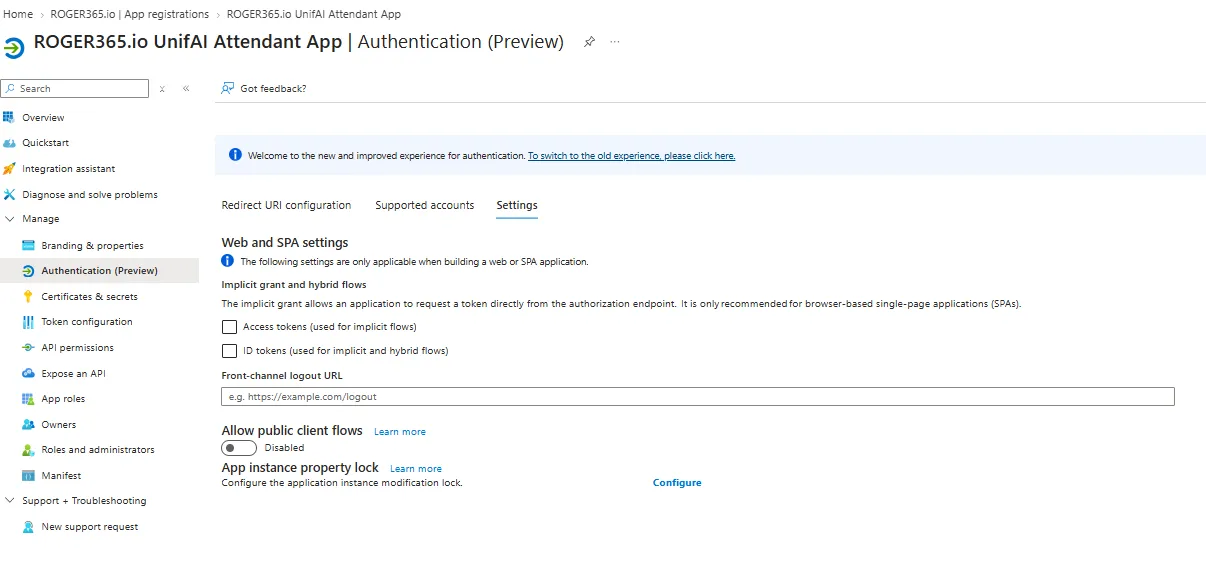
Select ‘Authentication’ on the left navigation menu and choose option settings

  • Make sure that Access tokens and ID Tokens are not selected

Then press the SAVE button.
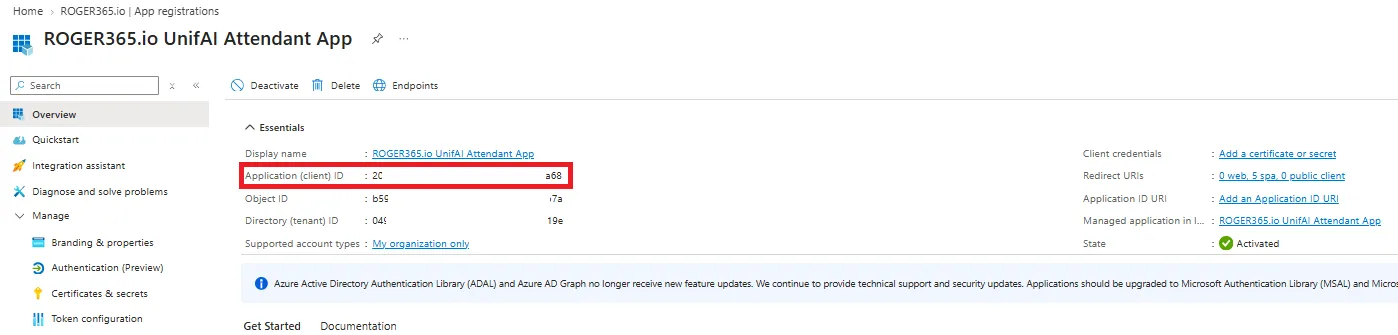
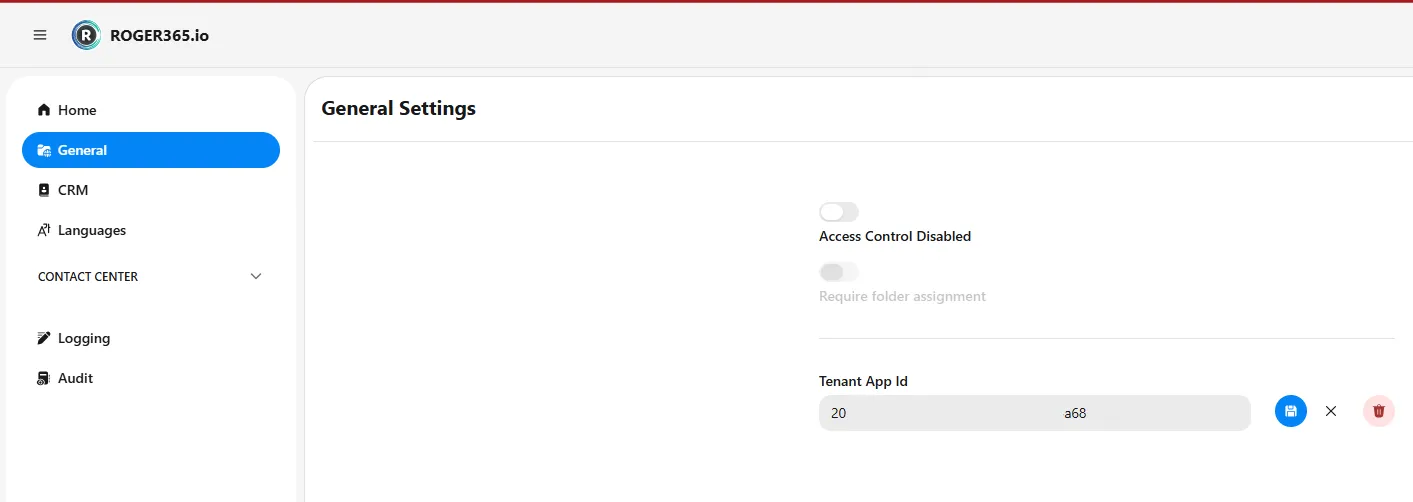
Finally, copy the Application (client) ID and paste it into the Tenant App Id field in the ROGER365.io admin portal.
On this page